16 minutes
Link Layer Attacks
ARP Spoofing & Abnormality Detection
-
Related PCAP File(s)—
ARP_Spoof.pcapng. -
Attackers have long misused the
Address Resolution Protocol (ARP)to carry out man-in-the-middle and denial-of-service attacks. -
Because of this common abuse, ARP is a key area/point to examine when analyzing network traffic, and it’s often the first protocol we check.
-
Many ARP attacks are broadcast to the entire network rather than targeting individual computers, which makes them easier to find using packet sniffing.
How Address Resolution Protocol Works
-
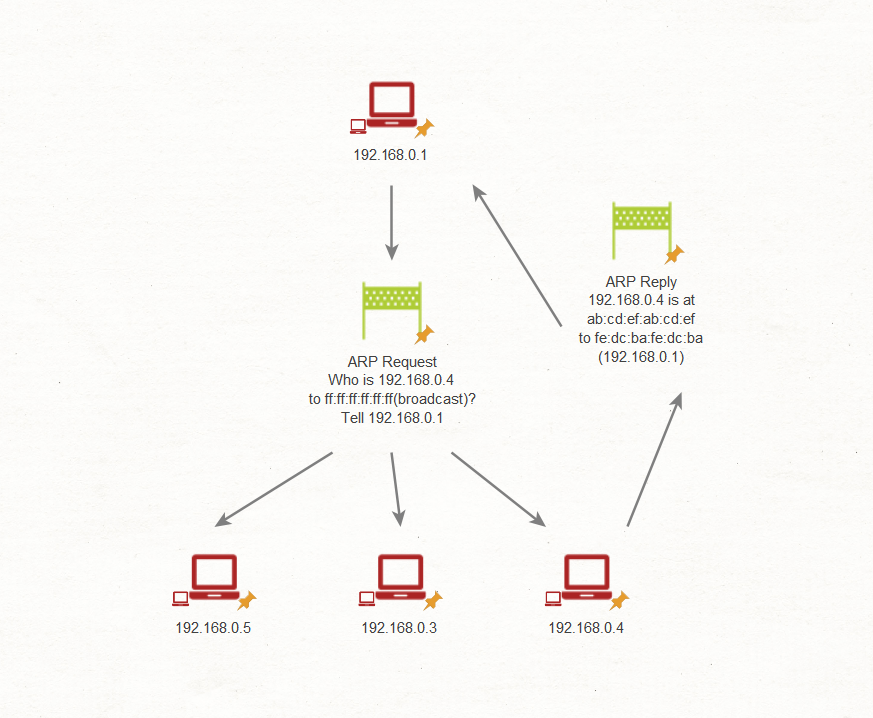
Firstly, we need to know how this protocol functions in its standard, or ‘vanilla’, operation.
-
In our network, hosts must know the physical address (MAC address) to which they must send their data (Destination MAC), which gave the idea to make ARP Protocol.
-
Let’s elucidate (وضح) this with a step-by-step process.
| Step | Description |
|---|---|
1 |
Imagine our first computer, or Host A, needs to send data to our second computer, Host B. To achieve successful transmission, Host A must ascertain the physical address of Host B. |
2 |
Host A begins by consulting its list of known addresses, the ARP cache, to check if it already possesses this physical address. |
3 |
In the event the address corresponding to the desired IP isn’t in the ARP cache, Host A broadcasts an ARP request to all machines in the subnet, inquiring, Who holds the IP x.x.x.x? |
4 |
Host B responds to this message with an ARP reply, Hello, Host A, my IP is x.x.x.x and is mapped to MAC address aa:aa:aa:aa:aa:aa. |
5 |
On receiving this response, Host A updates its ARP cache with the new IP-to-MAC mapping. |
6 |
Occasionally, a host might install a new interface, or the IP address previously allocated to the host might expire, necessitating an update and remapping of the ARP cache. Such instances could introduce complications when we analyze our network traffic. |
ARP Poisoning & Spoofing
-
In an ideal scenario, robust controls would be in place to thwart these attacks, but in reality, this isn’t always feasible.
-
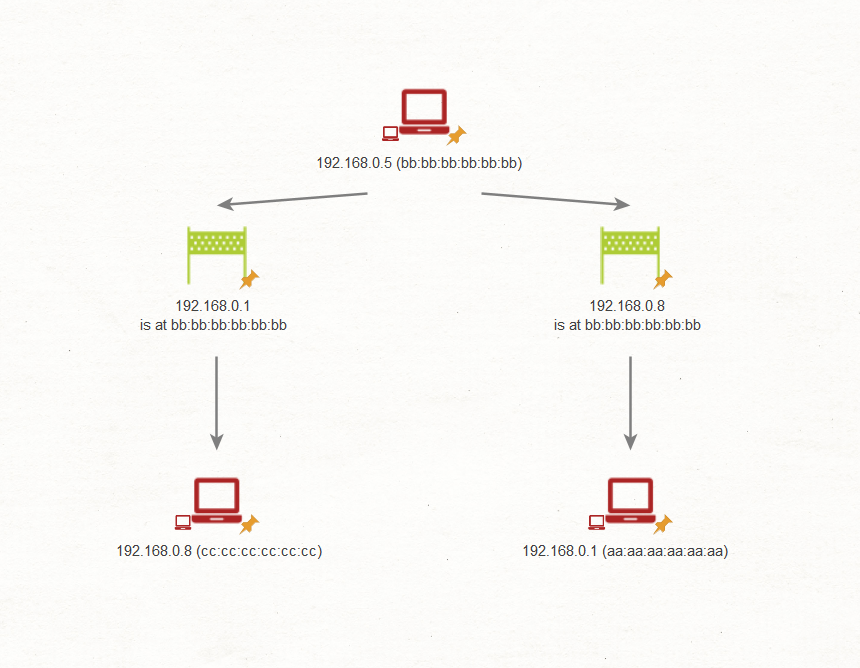
To comprehend (لفهم) our Indicators of Compromise (IOCs) more effectively, let’s delve into the behavior of ARP Poisoning and Spoofing attacks.
-
Detecting these attacks can be challenging, as they mimic the communication structure of standard ARP traffic.
-
Yet, certain ARP requests and replies can reveal their nefarious nature (طبيعة شريرة).
-
Let’s illustrate how these attacks function, enabling us to better identify them during our traffic analysis.
| Step | Description |
|---|---|
1 |
Consider a network with three machines: the victim’s computer, the router, and the attacker’s machine. |
2 |
The attacker initiates their ARP cache poisoning scheme by dispatching counterfeit ARP messages to both the victim’s computer and the router. |
3 |
The message to the victim’s computer asserts that the gateway’s (router’s) IP address corresponds to the physical address of the attacker’s machine. |
4 |
Conversely, the message to the router claims that the IP address of the victim’s machine maps to the physical address of the attacker’s machine. |
5 |
On successfully executing these requests, the attacker may manage to corrupt the ARP cache on both the victim’s machine and the router, causing all data to be misdirected to the attacker’s machine. |
6 |
If the attacker configures traffic forwarding, they can escalate the situation from a denial-of-service to a man-in-the-middle attack. |
7 |
By examining other layers of our network model, we might discover additional attacks. The attacker could conduct DNS spoofing to redirect web requests to a bogus site or perform SSL stripping to attempt the interception of sensitive data in transit. |
- Recognizing/Detecting these attacks is important, but preventing them is an even greater challenge.
- Here are some ways we might stop these attacks:
Static ARP Entries—We can prevent these attacks by making it harder to rewrite and corrupt the ARP cache. However, this will require more network maintenance and monitoring.Switch and Router Port Security—Implementing network profile controls and other measures can ensure that only authorized devices can connect to specific ports on our network devices, effectively blocking machines attempting ARP spoofing/poisoning.
Finding ARP Spoofing
- For detecting ARP Spoofing attacks, we’ll need to open the related traffic capture file (
ARP_Spoof.pcapng) from this module’s resources using Wireshark.
wireshark ARP_Spoof.pcapng
-
Employing this filter
arp.opcodestreamline our view to focus solely on ARP requests and replies.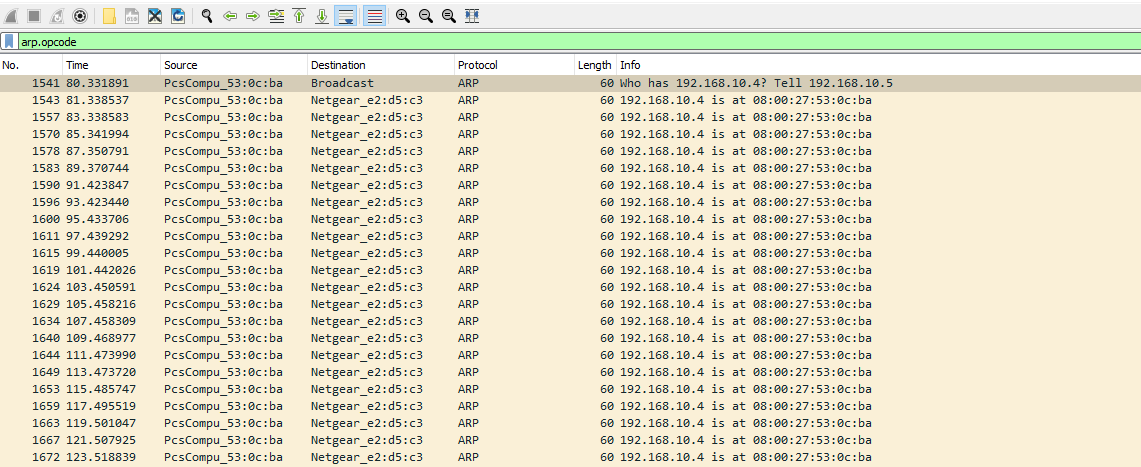
-
A key red flag we need to monitor is any anomaly in traffic emanating from a specific host.
-
For instance, one host incessantly broadcasting ARP requests and replies to another host could be a telltale sign of ARP spoofing.
-
In such a scenario, we might identify that the MAC address
08:00:27:53:0C:BA is behaving suspiciously. -
To ascertain this, we can fine-tune our analysis to inspect solely the interactions—both requests and replies—among:
- The attacker’s machine.
- The victim’s machine.
- The router.
-
The
opcodefunctionality inWiresharkcan simplify this process.Opcode == 1—This represents all types of ARP RequestsOpcode == 2—This signifies all types of ARP Replies
-
As a preliminary step, we could scrutinize the requests dispatched using the following filter.
arp.opcode == 1
-
Almost instantly, we should notice a red flag - an address duplication, accompanied by a warning message.
-
If we delve into the details of the error message within Wireshark, we should be able to extract additional information.

-
Upon immediate inspection, we might discern that one IP address is mapped to two different MAC addresses.
-
We can validate this on a Linux system by executing the appropriate commands.
ARP
$ arp -a | grep 50:eb:f6:ec:0e:7f

? (192.168.10.4) at 50:eb:f6:ec:0e:7f [ether] on eth0
$ arp -a | grep 08:00:27:53:0c:ba

? (192.168.10.4) at 08:00:27:53:0c:ba [ether] on eth0
-
In this situation, we might identify that our ARP cache, in fact, contains both MAC addresses allocated to the same IP address - an anomaly that warrants our immediate attention.
-
To sift through more duplicate records, we can utilize the subsequent Wireshark filter.
arp.duplicate-address-detected && arp.opcode == 2
Identifying The Original IP Addresses
-
To identify the device that changed its IP address via MAC spoofing, we need to determine the initial IP addresses of the devices.
-
If the attack was solely ARP-based:
- The victim’s IP address should remain constant.
- While the attacker’s IP address may have changed.
-
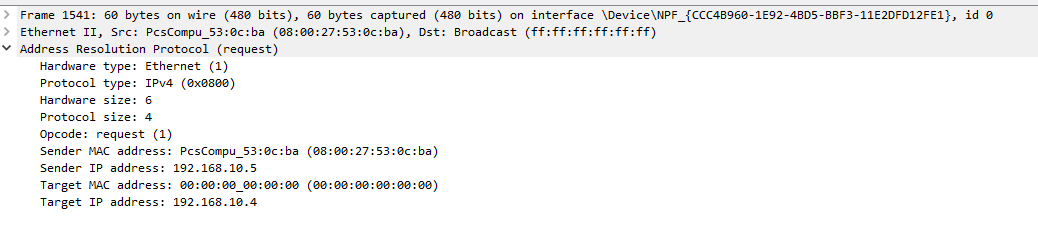
This information can be found in ARP requests and quickly located using a Wireshark filter.
(arp.opcode) && ((eth.src == 08:00:27:53:0c:ba) || (eth.dst == 08:00:27:53:0c:ba))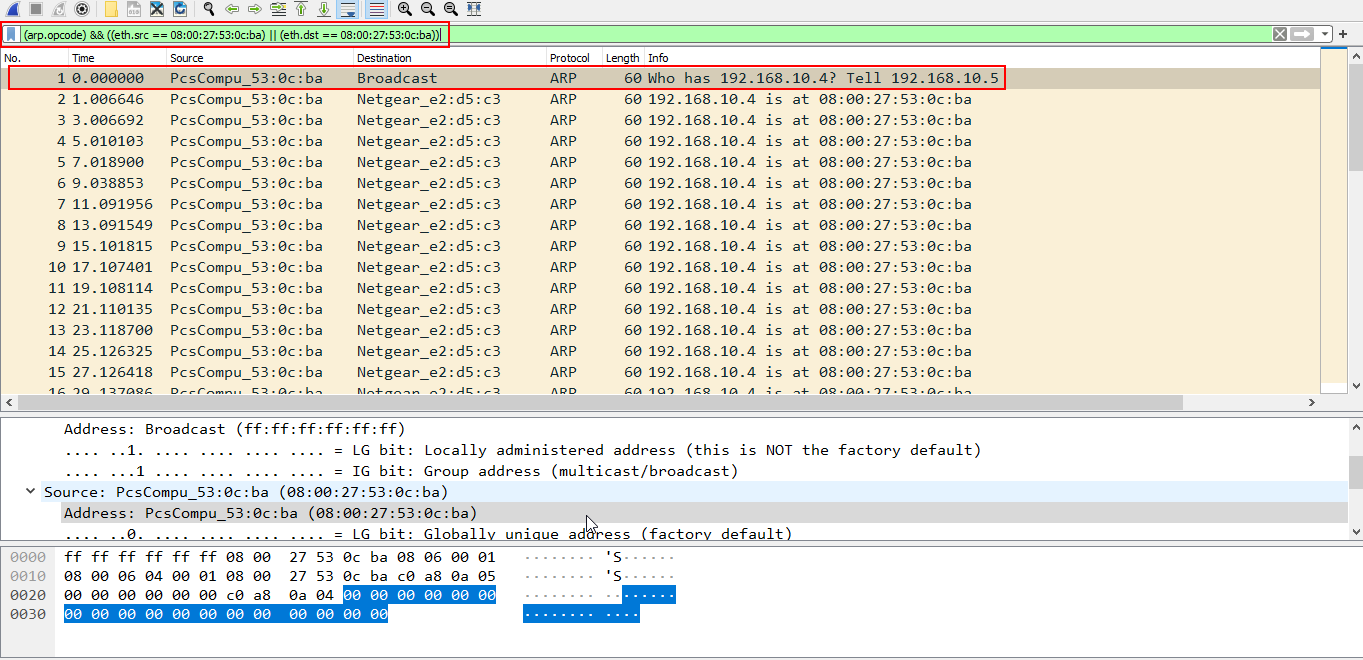
-
We might instantly note that the MAC address
08:00:27:53:0c:bawas initially linked to the IP address192.168.10.5, but this was recently switched to192.168.10.4. -
This transition is indicative of a deliberate attempt at ARP spoofing or cache poisoning.
-
Additionally, examining the traffic from these MAC addresses with the following Wireshark filter can prove insightful:
eth.addr == 50:eb:f6:ec:0e:7f or eth.addr == 08:00:27:53:0c:ba
-
We might notice some inconsistencies with TCP connections.
-
If TCP connections are consistently dropping, it’s an indication that the attacker is not forwarding traffic between the victim and the router.
-
If the attacker is, in fact, forwarding the traffic and is operating as a man-in-the-middle, we might observe identical or nearly symmetrical transmissions:
- From the victim to the attacker.
- From the attacker to the router.
ARP Scanning & Denial-of-Service
- Unusual patterns in the ARP requests and responses can be found.
- It is common knowledge that poisoning and spoofing form the core of most ARP-based
denial-of-service (DoS)andman-in-the-middle (MITM)attacks. - However, adversaries could also exploit ARP for information gathering.
ARP Scanning Signs
-
Related PCAP File(s)—
ARP_Scan.pcapng -
Some typical red flags indicative of ARP scanning are:
Broadcast ARP requests sent to sequential IP addresses (.1,.2,.3,...)Broadcast ARP requests sent to non-existent hostsPotentially, an unusual volume of ARP traffic originating from a malicious or compromised host
Finding ARP Scanning
-
The following traffic is noticed upon appling this filter
arp.opcode: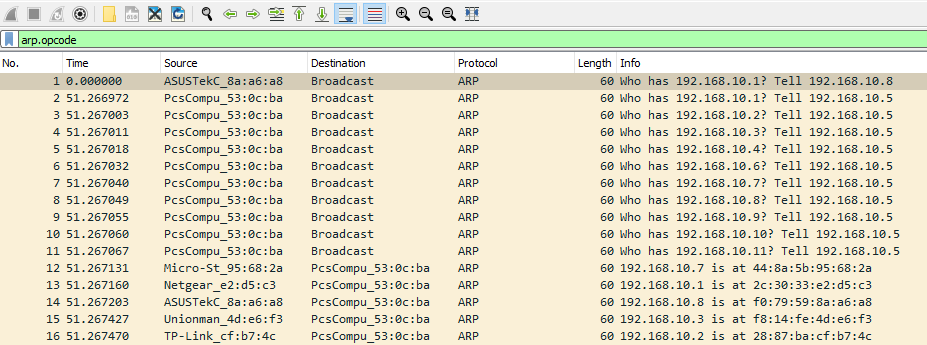
-
ARP requests propagated sequentially to all IP addresses by a single host indicate ARP scanning, and is a common feature of widely-used scanners such as
Nmap. -
We might notice that active hosts respond to these requests via their ARP replies.
-
This could signal the successful execution of the information-gathering tactic by the attacker.
Identifying Denial-of-Service
-
Related PCAP File(s)—
ARP_Poison.pcapng. -
An attacker:
- Can use ARP scanning to identify live hosts.
- Then deny service to them by poisoning the subnet and manipulating ARP caches.
-
This strategy also enables man-in-the-middle attacks.
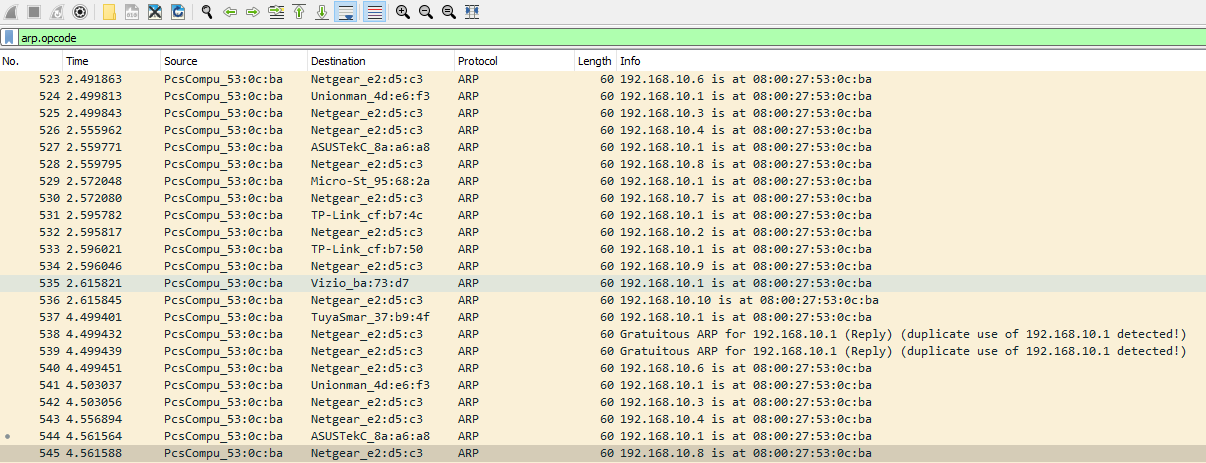
-
Promptly, we might note that the attacker’s ARP traffic may shift its focus towards declaring new physical addresses for all live IP addresses.
-
The intent here is to corrupt the router’s ARP cache.
-
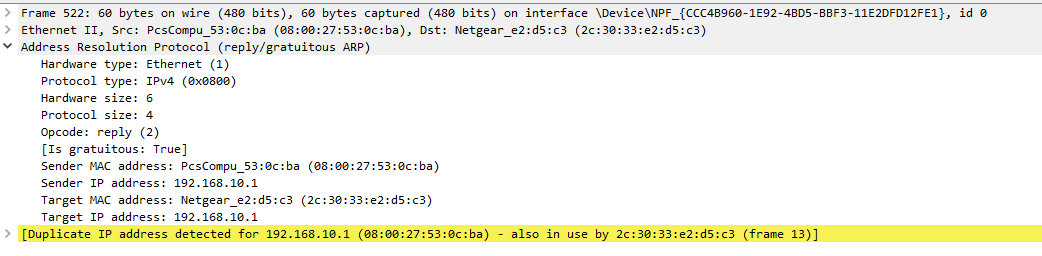
Conversely, we may witness the duplicate allocation of
192.168.10.1to client devices. -
This indicates that the attacker is attempting to corrupt the ARP cache of these victim devices with the intention of obstructing traffic in both directions.
Responding To ARP Attacks
-
Upon identifying any of these ARP-related anomalies, we might question the suitable course of action to counter these threats.
-
Here are a couple of possibilities:
Tracing and Identification—The attacker’s computer is a real, physical device located somewhere. If we can find its location, we might be able to stop/halt the attack. Sometimes, we discover that the computer launching the attack has also been compromised and is controlled by someone else.Containment—To prevent the attacker from stealing/exfiltrating more information, we can disconnect or isolate the affected area at the switch or router level. This would stop a DoS or MITM attack where it starts.
-
Link layer attacks often fly under the radar.
-
While they may seem insignificant to identify and investigate, their detection could be pivotal in preventing the exfiltration of data from higher layers of the OSI model.
802.11 Denial of Service
-
Related PCAP File(s)—
deauthandbadauth.cap. -
In traffic analysis, examining link-layer protocols and communications is always crucial.
-
A common link-layer attack targets
Wi-Fi (802.11). -
We might easily overlook this type of attack, but because human errors can compromise our perimeter security, regular audits of our wireless networks are vital.
Capturing 802.11 Traffic
-
To analyze raw 802.11 network traffic, you’ll need either a Wireless Intrusion Detection System (WIDS) or a Wireless Intrusion Prevention System (WIPS).
-
Alternatively, you can use a wireless NIC (network interface card) that’s set to monitor mode.
-
Monitor mode is similar to promiscuous mode in Wireshark; it allows you to see raw 802.11 frames and other types of network packets that you wouldn’t normally be able to see.
-
Let’s assume we do possess a Wi-Fi interface capable of monitor mode.
-
We could enumerate our wireless interfaces in Linux using the following command:
Wireless Interfaces
iwconfig
wlan0     IEEE 802.11  ESSID:off/any
          Mode:Managed  Access Point: Not-Associated   Tx-Power=20 dBm
          Retry short  long limit:2   RTS thr:off   Fragment thr:off
          Power Management:off
- We have a couple of options to set our interface into monitor mode.
Airmon-NG
- Firstly, employing
airodump-ng, we can use the ensuing command:
sudo airmon-ng start wlan0
Found 2 processes that could cause trouble.
Kill them using 'airmon-ng check kill' before putting the card in monitor mode, they will interfere by changing channels and sometimes putting the interface back in managed mode

    PID Name
    820 NetworkManager
    1389 wpa_supplicant

PHY Interface Driver Chipset

phy0 wlan0 rt2800usb Ralink Technology, Corp. RT2870/RT3070
            (mac80211 monitor mode vif enabled for [phy0]wlan0 on [phy0]wlan0mon)
            (mac80211 station mode vif disabled for [phy0]wlan0)
Monitor Mode
- Secondly, using system utilities, we would need to:
- Deactivate our interface.
- Modify its mode.
- Then reactivate it.
sudo ifconfig wlan0 down
sudo iwconfig wlan0 mode monitor
sudo ifconfig wlan0 up
- We could verify if our interface is in
monitor modeusing theiwconfigutility.
iwconfig
wlan0mon IEEE 802.11 Mode:Monitor Frequency:2.457 GHz Tx-Power=20 dBm
         Retry short long limit:2 RTS thr:off Fragment thr:off
         Power Management:off
-
It’s possible that our interface doesn’t conform to the
wlan0monconvention. Instead, it might bear a name such as the following:wlan0. -
The crucial factor here is that the mode should be
monitor. -
The name of the interface isn’t particularly important, and in many cases, our Linux distribution might assign it a completely different name.
-
To commence/begin capturing traffic from our clients and network, we can employ
airodump-ng. -
We need to specify our AP’s:
- Channel with
-c. - Its BSSID with
--bssid. - The output file name with
-w.
- Channel with
sudo airodump-ng -c 4 --bssid F8:14:FE:4D:E6:F1 wlan0 -w raw
BSSID             PWR RXQ Beacons #Data, #/s CH MB ENC   CIPHER AUTH ESSID
F8:14:FE:4D:E6:F1 -23 64  115      6     0   4  130 WPA2 CCMP   PSK HTB-Wireless
- We can use
tcpdumpto achieve similar outcomes, butairodump-ngproves equally effective.
How Deauthentication Attacks Work
-
Among the more frequent attacks we might witness or detect is a deauthentication/dissociation attack.
-
This is a common type of attack on network links that attackers might use for various purposes:
To capture the WPA handshake to perform an offline dictionary attackTo cause general denial of service conditionsTo enforce users to disconnect from our network, and potentially join their network to retrieve information
-
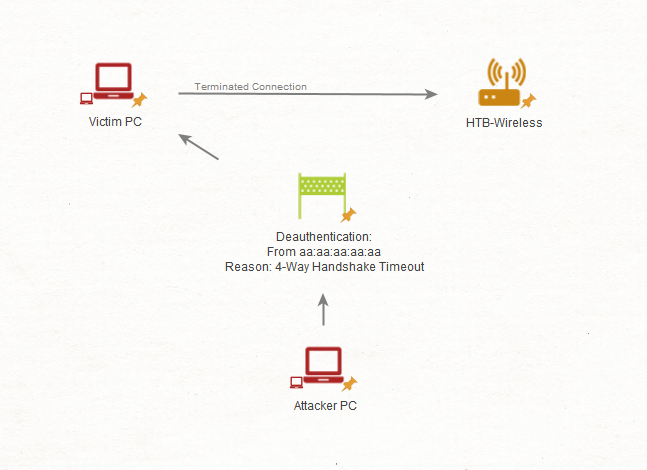
In essence, the attacker will fabricate an
802.11deauthentication frame pretending it originates from our legitimate access point. -
By doing so, the attacker might manage to disconnect one of our clients from the network.
-
Often, the client will reconnect and go through the handshake process while the attacker is sniffing.
-
In this attack, the attacker changes the sender’s MAC address in a network frame to a fake one.
-
Without extra security measures like IEEE 802.11w (Management Frame Protection), a client device can’t easily detect this.
-
Each deauthentication request includes a reason code that explains why the client is being disconnected.
-
In most scenarios, basic tools like
aireplay-ngandmdk4employ reasoncode 7for deauthentication.
Finding Deauthentication Attacks
- To detect these potential attacks, we can open the related traffic capture file (
deauthandbadauth.cap) as shown below.
Wireshark
sudo wireshark deauthandbadauth.cap
-
If we wanted to limit our view to traffic from our AP’s BSSID (
MAC), we could use the following Wireshark filter:wlan.bssid == xx:xx:xx:xx:xx:xx.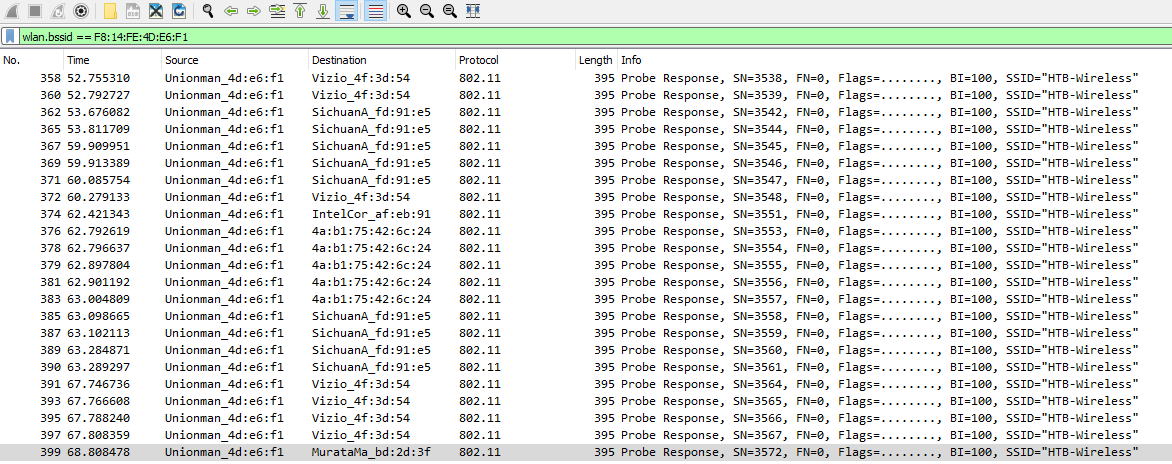
-
Suppose we wanted to take a look at the deauthentication frames from our BSSID or an attacker pretending to send these from our BSSID, we could use the following Wireshark filter:
-
(wlan.bssid == xx:xx:xx:xx:xx:xx) and (wlan.fc.type == 00) and (wlan.fc.type_subtype == 12) -
With this filter, we specify:
- The type of frame (
management) with00. - The subtype (
deauthentication) with12.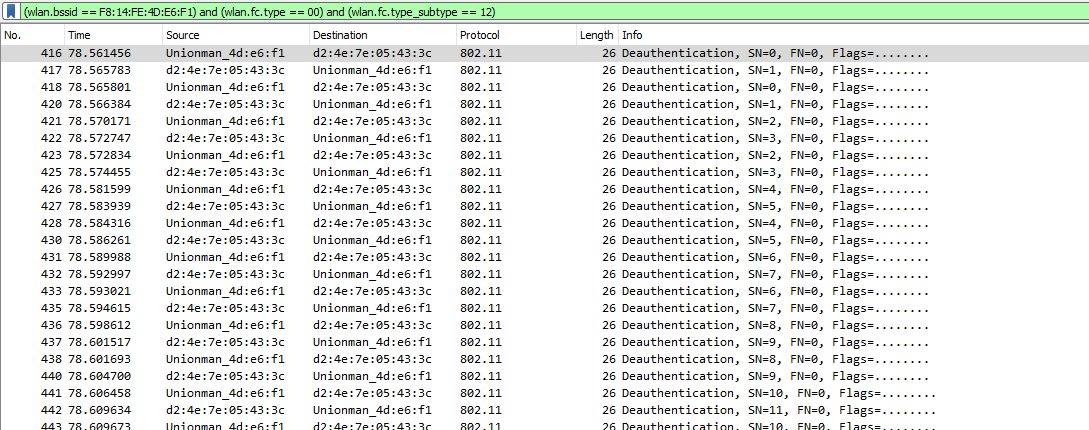
- The type of frame (
-
We might notice right away that an excessive amount of deauthentication frames were sent to one of our client devices.
-
This would be an immediate indicator of this attack.
-
Additionally, if we were to open the fixed parameters under wireless management, we might notice that reason
code 7was utilized.
-
As previously mentioned, if we wanted to verify this was done by an attacker, we should be able to filter even further for only deauthentication requests with reason
code 7. -
As mentioned,
aireplay-ngandmdk4, which are common attack tools, utilize this reason code by default. -
We could do with the following Wireshark filter.
-
(wlan.bssid == F8:14:FE:4D:E6:F1) and (wlan.fc.type == 00) and (wlan.fc.type_subtype == 12) and (wlan.fixed.reason_code == 7)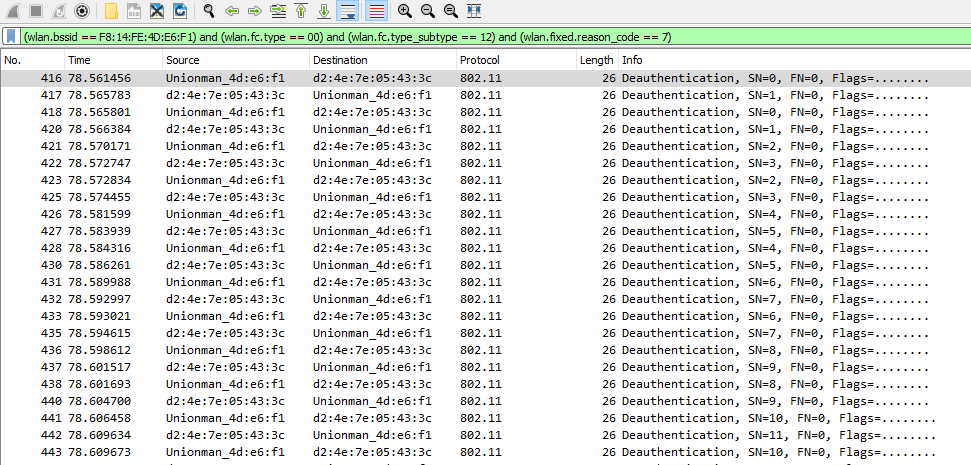
Revolving Reason Codes
-
A sophisticated attacker might evade detection by rotating/revolving reason codes to avoid triggering alarms from wireless intrusion detection systems.
-
The trick to this technique of detection is incrementing like an attacker script would. We would first start with reason code 1.
-
(wlan.bssid == F8:14:FE:4D:E6:F1) and (wlan.fc.type == 00) and (wlan.fc.type_subtype == 12) and (wlan.fixed.reason_code == 1)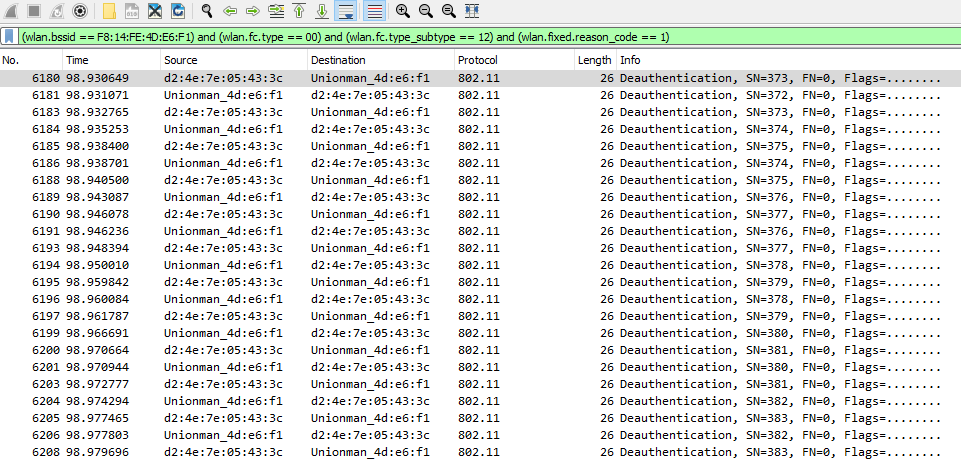
-
Then we would shift over to reason code 2.
-
(wlan.bssid == F8:14:FE:4D:E6:F1) and (wlan.fc.type == 00) and (wlan.fc.type_subtype == 12) and (wlan.fixed.reason_code == 2)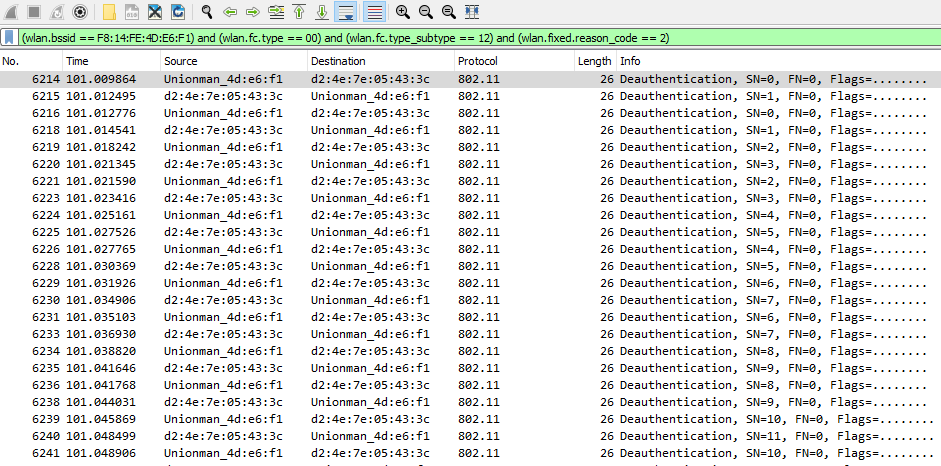
-
We would continue this sequence.
-
(wlan.bssid == F8:14:FE:4D:E6:F1) and (wlan.fc.type == 00) and (wlan.fc.type_subtype == 12) and (wlan.fixed.reason_code == 3)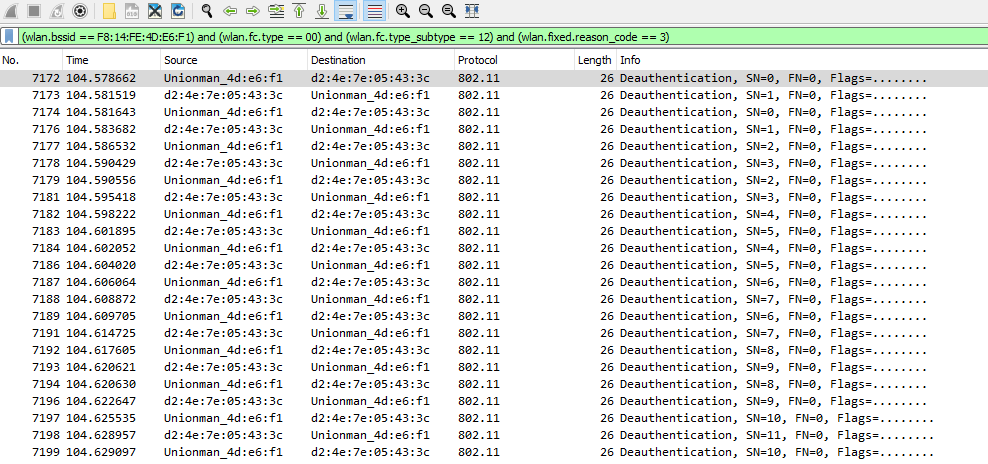
-
As such, deauthentication can be a pain to deal with, but we have some compensating measures that we can implement to prevent this from occurring in the modern day and age.
-
These are:
Enable IEEE 802.11w (Management Frame Protection) if possibleUtilize WPA3-SAEModify our WIDS/WIPS detection rules
Finding Failed Authentication Attempts
-
Suppose an attacker was to attempt to connect to our wireless network.
-
We might notice an excessive amount of association requests coming from one device.
-
To filter for these we could use the following.
-
(wlan.bssid == F8:14:FE:4D:E6:F1) and (wlan.fc.type == 00) and (wlan.fc.type_subtype == 0) or (wlan.fc.type_subtype == 1) or (wlan.fc.type_subtype == 11)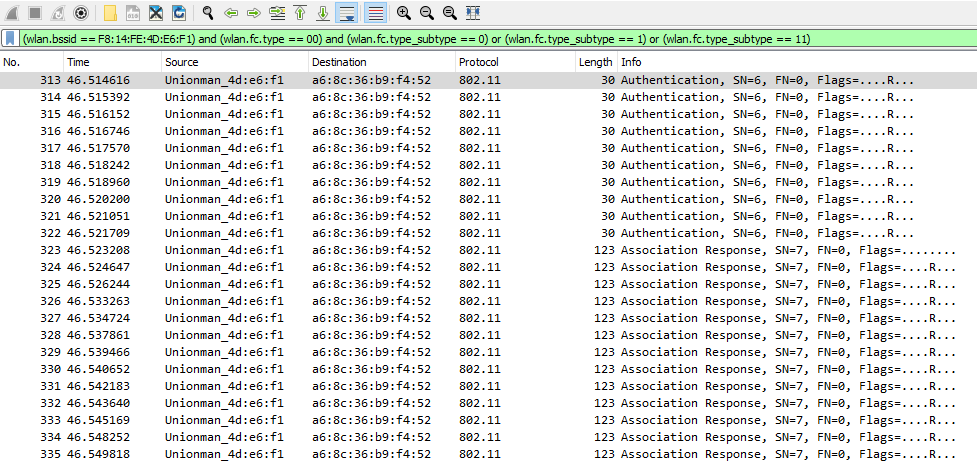
-
Therefore, we need to be able to tell the difference between normal Wi-Fi (802.11) network activity and malicious network activity.
-
From this point of view, having security at the link-layer can determine whether our security is breached.
Rogue Access Point & Evil-Twin Attacks
-
Related PCAP File(s)—
rogueap.cap. -
Dealing with rogue/unauthorized access points and evil-twin attacks can be difficult because they are often hard to find.
-
However, with the right methods/strategies, you can identify and handle these illegitimate access points well.
-
When it comes to harmful access points, rogue and evil-twin attacks are always major issues.
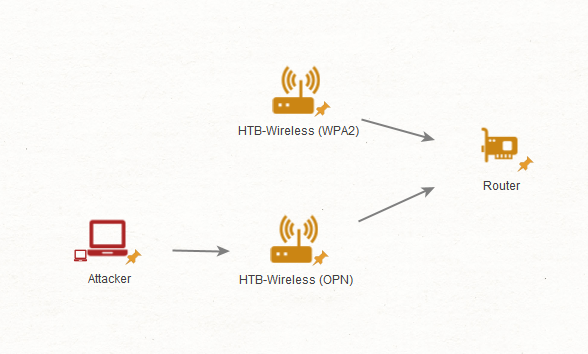
-
A rogue access point is mainly used to bypass/cirumvent security measures.
-
Attackers might install one to avoid network restrictions, which could be hotspots or tethered connections.
-
These access points can even infiltrate networks that are supposed to be isolated.
-
Their main purpose is to give unauthorized access to secure parts of a network.
-
It’s important to remember that rogue access points are directly connected to the network.
Evil-Twin
-
An evil twin, however, is set up by an attacker for various malicious purposes.
-
The main point is that these access points are usually not connected to your network.
-
Instead, they are independent access points that might include a web server or similar component to intercept communications between wireless clients.
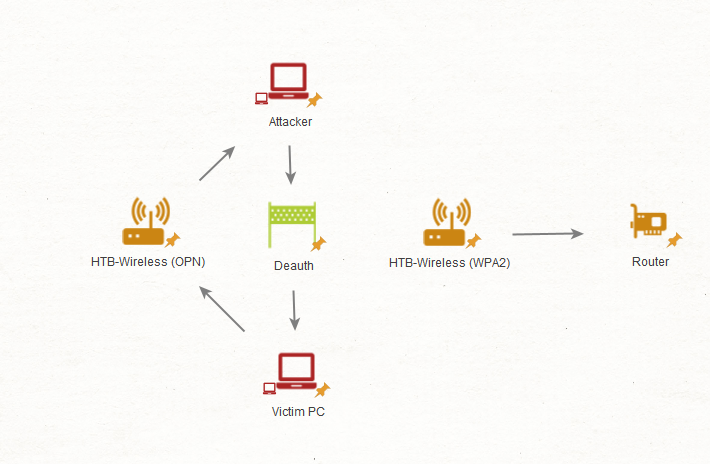
-
Attackers might set these up to harvest wireless or domain passwords among other pieces of information.
-
Commonly, these attacks might also encompass a hostile portal attack.
Airodump-ng Detection
- Right away, we could utilize the ESSID filter for Airodump-ng to detect Evil-Twin style access points.
sudo airodump-ng -c 4 --essid HTB-Wireless wlan0 -w raw
CH  4 ][ Elapsed: 1 min ][ 2023-07-13 16:06
 BSSID              PWR RXQ  Beacons    #Data, #/s  CH   MB   ENC CIPHER  AUTH ESSID
 F8:14:FE:4D:E6:F2   -7 100      470      155    0   4   54   OPN              HTB-Wireless
 F8:14:FE:4D:E6:F1   -5  96      682        0    0   4  324   WPA2 CCMP   PSK  HTB-Wireless
-
The previous example illustrates how an attacker could create a fake Wi-Fi hotspot with the same name as your network.
-
This is often done to set up a malicious portal, where the attacker tries to steal usernames and passwords from unsuspecting users.
-
You should also watch out for deauthentication attacks, which might indicate that the attacker is trying to force users onto their fake network.
-
To conclusively ascertain whether this is an anomaly or an Airodump-ng error, we can commence our traffic analysis efforts (
rogueap.cap). -
To filter for beacon frames, we could use the following.
-
(wlan.fc.type == 00) and (wlan.fc.type_subtype == 8)
-
Beacon analysis is crucial in differentiating between genuine and fraudulent access points.
-
One of the initial places to start is the
Robust Security Network (RSN)information. -
This data communicates valuable information to clients about the supported ciphers, among other things.
-
Suppose we wish to examine our legitimate access point’s RSN information.
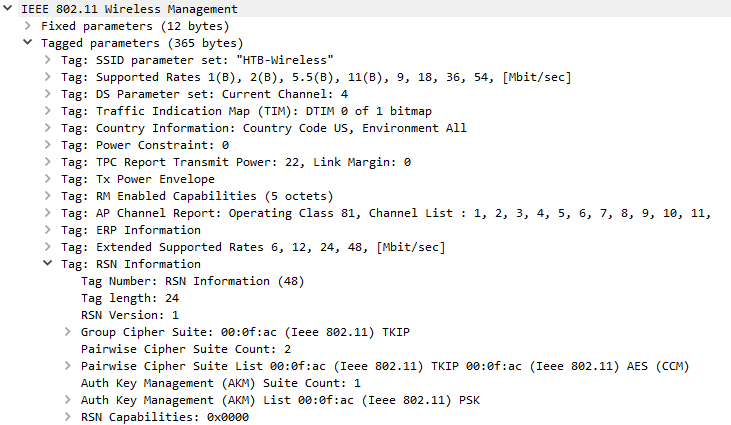
-
It would indicate that WPA2 is supported with AES and TKIP with PSK as its authentication mechanism.
-
However, when we switch to the illegitimate access point’s RSN information, we may find it conspicuously missing.
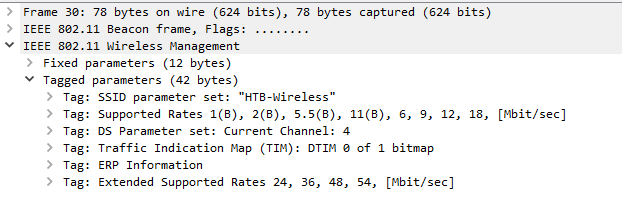
-
Most of the time, a typical evil-twin attack will have this feature.
-
However, we should always check other details for differences, especially with more advanced evil-twin attacks.
-
For instance, an attacker could use the same encryption method as our access point, making the attack harder to spot.
-
If that happens, we can look at other parts of the beacon frame, like vendor-specific information, which the attacker’s access point probably won’t have.
Finding a Fallen User
-
Despite comprehensive security awareness training, some users may fall prey to attacks like these.
-
Fortunately, in the case of open network style evil-twin attacks, we can view most higher-level traffic in an unencrypted format.
-
To filter exclusively for the evil-twin access point, we would employ the following filter.
-
(wlan.bssid == F8:14:FE:4D:E6:F2)
-
If we see ARP requests coming from a client device on the suspicious network, it could mean the device is compromised.
-
If this happens, we should save information about the device to help us respond to the incident.
Its MAC addressIts host name
-
Consequently, we might be able to instigate password resets and other reactive measures to prevent further infringement of our environment.
Finding Rogue Access Points
- On the other hand, detecting rogue access points can often be a simple task of checking our network device lists.
- In the case of hotspot-based rogue access points (such as Windows hotspots), we might scrutinize wireless networks in our immediate vicinity.
- If we encounter an unrecognizable wireless network with a strong signal, particularly if it lacks encryption, this could indicate that a user has established a rogue access point to navigate around our perimeter controls.
3400 Words
2026-04-24 01:51